
What "AI Trained on Your Catalog" Actually Means
 Frederick Casey Housand - May 20, 2026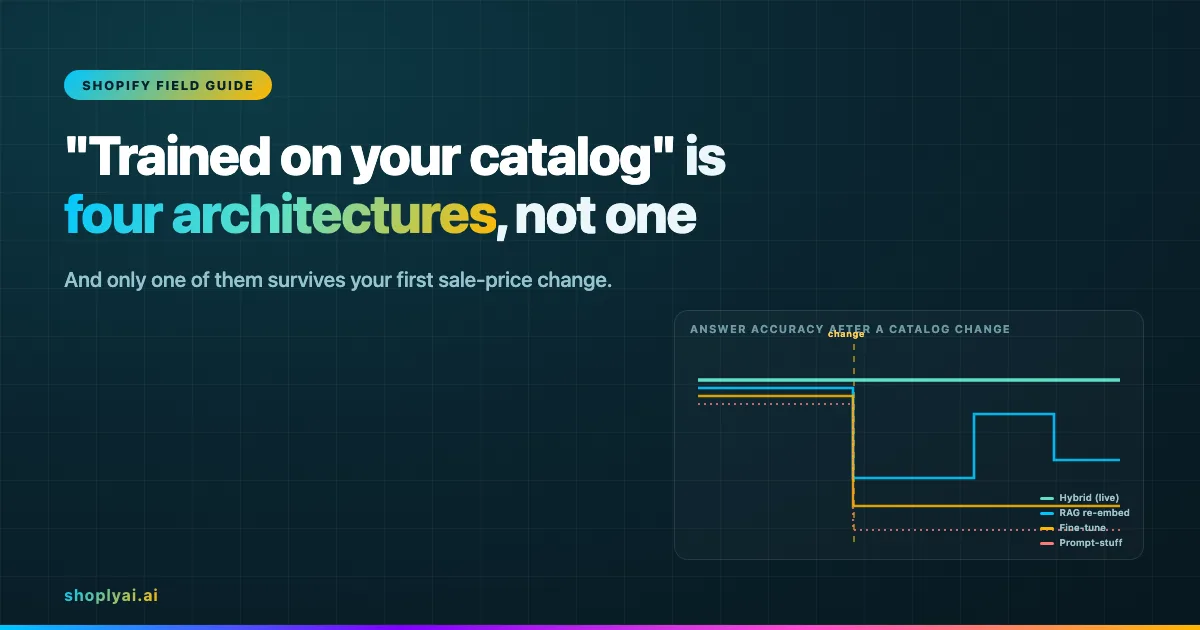
“AI trained on your catalog” is four different architectures wearing one marketing phrase, and they fail in four different ways the day your store changes. This is a vendor-neutral field guide (Updated June 2026) to what the phrase can mean, how to tell which one you are buying, and why the difference only shows up after your first sale-price change.
I would rather an operator know which architecture a vendor is selling than trust the demo. The demo answers from a catalog snapshot that was fresh the minute it was captured, and quietly wrong by the next sale.
The scene repeats almost word for word across stores. A bot that “knows your products” nails every question during the pitch. The store installs it. About 24 hours later a shopper asks about a product that just went on sale, and the bot quotes the old price with total confidence. Nothing errored. The answer was simply stale, and stale answers do not announce themselves.
What follows is the teardown, not the brochure. The four architectures behind “trained on your catalog” are different machines with different failure curves, and the choice between them is really a choice about how stale you can stand your answers to be. The structural case for why live-catalog reasoning needs combined search and chat retrieval lives in the AI Search and Chatbot pillar . This post is the diagnostic that gets you there.
See how that catalog knowledge appears in Shoply AI Search summaries, product results, and filters.
What does “trained on your catalog” actually mean?
“Trained on your catalog” is a marketing phrase, not an architecture. It tells a shopper the bot has seen your products. It hides which of four mechanisms actually puts those products in front of the model, and an operator cannot tell which one from a demo, because all four look identical on day one.
For Shoply specifically, check which products Shoply indexes and how exclusions affect the available catalog.
The tell is what the strongest competitor pages leave out. Spurnow’s roughly 8,000-word Shopify guide has a section literally titled “What ‘Trained on Your Store’ Really Means” and never names a single architecture. It covers data sources, which products get indexed and which fields get read, and never touches how the system stays current after those products change.
That is the gap. The phrase is the one we picked apart in the multilingual chatbot piece : technically true on the surface, practically wrong the moment production reality arrives. A vendor can honestly say a bot is trained on your catalog and still be running the architecture that goes stale fastest.
What are the four architectures behind a Shopify chatbot trained on your products?
There are four, and each reads your catalog at a different moment. That moment is the whole story.
- Prompt-stuffed catalog snippets: paste a slice of the catalog into the system prompt when a conversation starts.
- Fine-tuning on the product corpus: bakes the catalog into the model’s weights at training time.
- RAG with rolling re-embedding: turns products into vectors in an index and retrieves the relevant ones per query.
- Hybrid retrieval: combines semantic and lexical search, reranks the results, and adds a live lookup for fields that change often, like price and stock.
The cleanest way to see the difference is to follow a single catalog change from the Shopify admin to the shopper’s answer. Diagram (a) traces that path for all four.
The decision rule engineering teams converged on in 2026 is blunt: put stable behavior in fine-tuning, put volatile knowledge in retrieval. As the dev.to teardown on RAG versus fine-tuning puts it , “if your data changes weekly, fine-tuning it into weights is self-inflicted pain.”
A Shopify catalog is the textbook case of volatile knowledge. Price moves with every sale, stock with every order, and variants get renamed mid-season. RAG is the canonical fix for grounding a model in current data (AWS’s definition is the neutral reference), and the peer-reviewed work on dynamic recommendation now argues for pairing retrieval with live updates (arXiv 2510.20260 , ACM RecSys 2025).
The cadence gap is wide:
- Fine-tuned knowledge refreshes monthly at best.
- RAG refreshes many times within a week.
- Live lookups refresh per query.
Why does my Shopify chatbot give the wrong price after a sale?
Because the architecture under the hood has not caught up to the change yet, and the gap between the change and the catch-up is where wrong answers live.
The dangerous part is not that the answer is wrong. It is that the answer is wrong and confident. The model retrieves a stale embedding or quotes a memorized number and presents it with the same fluency it uses for correct answers, so nothing in the reply signals that anything is off.
Each architecture has a different gap. Diagram (b) lines them up by how long each one keeps answering wrong.
The shapes come straight from how each system handles the gap. The Sanity team, writing about agent context , describes the RAG version exactly: “if your embedding pipeline runs on a schedule (hourly, daily, sometimes weekly), the agent keeps serving old data in the gap,” and “a stale embedding returns a confident answer. There’s no signal that anything is wrong.”
Fine-tuning is worse on volatile data. As the dev.to writeup warns , “the model has confidently memorized last quarter’s numbers.”
A sporting-goods store is the worst case. Stock and in-store pickup shift hourly, so a once-a-day re-embed leaves the store wrong for most of the day, and the wrongness never surfaces as an error.
The decay stays invisible for the same reason we found reading 23,000 chatbot conversations : shoppers who get a confident wrong answer rarely file a ticket. They just leave, and the curve keeps running with nobody watching it.
How can I tell if my AI chatbot uses RAG or fine-tuning?
Use the step-by-step checklist to test live stock, prices, and orders on your own store.
Run a field test any operator can do without engineering help:
- Change one product in the Shopify admin (drop the price, or flip a variant to out of stock).
- Ask the bot about that exact product at intervals: right away, an hour later, and 24 hours later.
- Watch when the answer corrects itself.
The lag is the architecture’s signature:
- Never corrects without a retrain: prompt-stuffed or fine-tuned.
- Corrects on a clock: RAG.
- Right immediately and stays right: reading live.
The diagnostic works because it measures the one thing the demo hides: time. To pin down the architecture from the vendor side, ask three questions and read the answers against diagram (a).
- How often do you re-embed or re-sync the catalog? A number in hours or days means RAG on a schedule, and that interval is your worst-case staleness window. No number, or “it’s in the prompt,” points at prompt-stuffing.
- Do you read price and stock live, or from the index? “From the index” means the volatile fields decay with the re-embed cadence. “Live” is the only answer that survives a sale.
- What happens to answers between syncs? If the honest answer is “they reflect the last sync,” you now know the bot will be wrong for the length of the gap, confidently.
This is the same instinct behind auditing your site-search logs : watch what a system does over time and it tells you what it actually is.
The architecture that passes the field test reads volatile fields live. That is the combined search-and-chat retrieval approach Shoply’s zero-setup autonomous learning is built around, which is what makes adding AI search to a Shopify store a freshness decision rather than a feature toggle.
Why the architecture choice is really a freshness choice
The four architectures are not four feature levels. They are four answers to one question: how stale can your shopper-facing answers be before the store loses the sale?
- Prompt-stuffing and fine-tuning accept stale-until-refresh and bet your catalog rarely changes.
- RAG narrows the window to the re-embed interval.
- Hybrid retrieval with live lookups keeps it near zero for the fields that move.
Draw your own decay curve and pick the one you can live with through a real sale.
For most Shopify catalogs the volatile fields change faster than any scheduled refresh, which is why the 2026 production consensus landed on retrieval plus live updates rather than a one-time train (arXiv 2510.20260 ). The deeper case for why combined search and chat retrieval beats either alone is the premise of the AI Search and Chatbot pillar , and the 23-languages writeup is the field-notes version of running it in production. What breaks past a million SKUs is where the same retrieval choice gets stress-tested at catalog scale.
Frequently asked questions
What does it mean when a Shopify chatbot is “trained on your catalog”?
It means the bot has been given access to your products through one of four mechanisms: a catalog snapshot pasted into the prompt, a fine-tune baked into the model weights, a RAG vector index queried per question, or a hybrid that retrieves and reads price and stock live. The phrase says nothing about which one, and the four behave very differently after a catalog change.
Why does my chatbot give the wrong price after I run a sale?
Because its catalog data has not caught up to the change yet. Prompt-stuffed and fine-tuned bots stay wrong until the next snapshot or retrain; a RAG bot stays wrong until its next scheduled re-embed, which can be hours or a day away. The wrong price comes back confident, with no error signal, which is what makes it dangerous.
How can I tell if my AI chatbot uses RAG or fine-tuning?
Change one product in the Shopify admin, then ask the bot about it immediately, an hour later, and 24 hours later. If the answer never corrects without a retrain, it is fine-tuned or prompt-stuffed; if it corrects on a regular clock, it is RAG; if it is right the moment you change it, it is reading live. The lag is the signature.
If your catalog changes faster than your chatbot
If your store runs real sales, restocks, and seasonal swaps, and you want answers that stay correct through every one of them, Shoply AI combines AI Search and a chatbot over one product index with zero-setup autonomous learning. That is the live-catalog-reasoning architecture this guide describes.
- Try it: Shopify listing at apps.shopify.com/shopping-assistant-by-shoplyai , live demo at demo.shoplyai.ai .
- Go deeper: the structural argument in the AI Search and Chatbot pillar .
- Next step: how to train the chatbot on your store knowledge .
Happy selling.