
How to Replace Your FAQ Page with Smart AI Chatbot: More Ways to Engage Customers
 Rui Jiang - Feb 2, 2026
Tired of maintaining outdated FAQ pages? Static FAQ pages become stale quickly, require constant updates, and often fail to answer the specific questions your customers actually have. With Shoply AI, you can replace your traditional FAQ page with a smart AI chatbot that provides dynamic, always-accurate answers to customer questions.
Whether you need an AI-powered customer FAQ, product-specific FAQ automation, or a complete FAQ page replacement, these features let you create contextual, personalized experiences that guide shoppers exactly where they need to go.
Why Replace Your FAQ Page with AI?
Traditional FAQ pages have major limitations:
- Quickly outdated: Shipping times change, policies update, inventory fluctuates—but FAQ pages stay static
- One-size-fits-all: Generic answers don’t address specific customer situations
- Hard to maintain: Adding new FAQs means manual updates across your site
- Poor discovery: Customers can’t find answers if you didn’t anticipate their exact question
An AI FAQ chatbot solves all of these problems by providing dynamic, contextual answers that are always accurate and always available.
Smart Customer FAQ with Pre-filled Questions
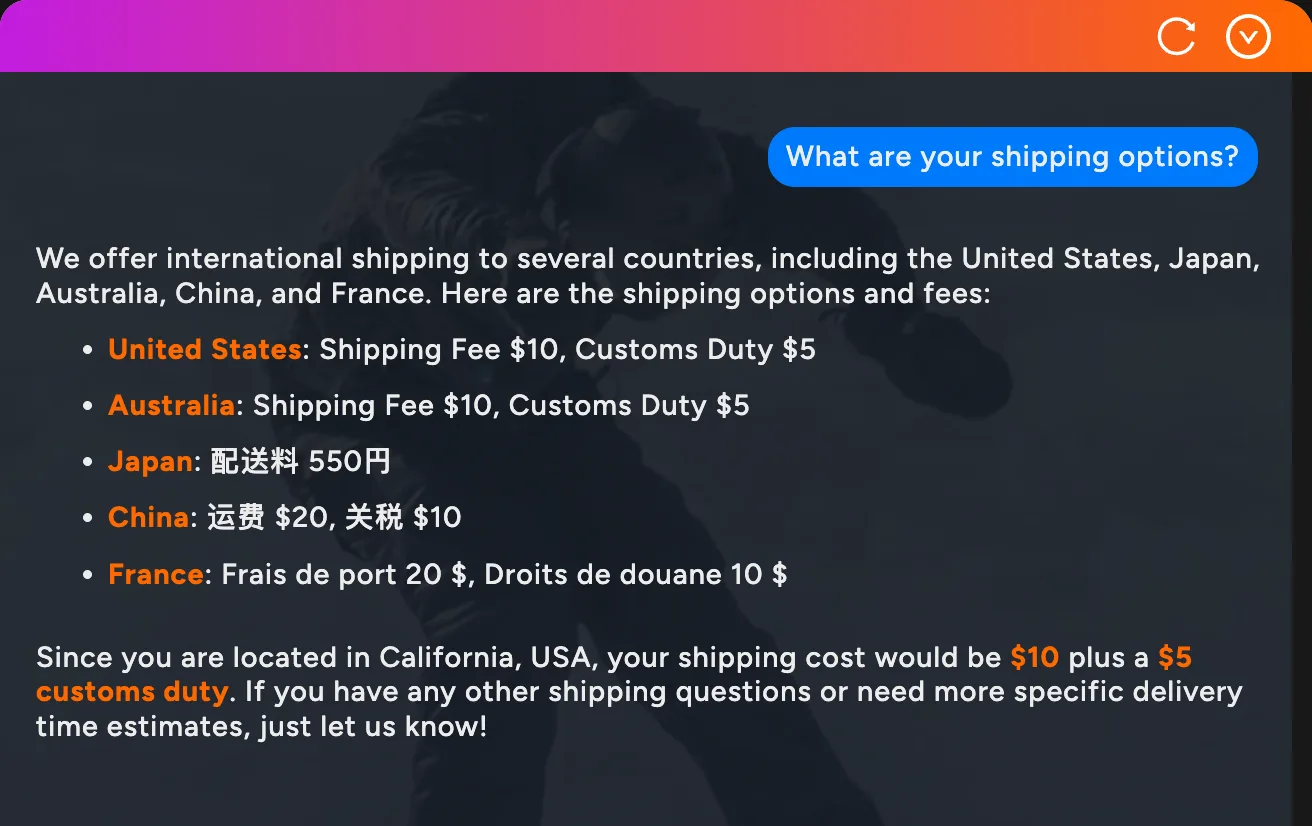
Want to proactively answer customer FAQs before they even ask? Use the #shoply_question= hash fragment to create smart FAQ links that open the AI chatbot with any predefined question—and get dynamic answers based on your store’s latest information and inventory.
How It Works
Simply add #shoply_question=your question here to any URL on your store:
https://demo.shoplyai.ai#shoply_question=What are your shipping options?When a customer visits this link, the AI FAQ chatbot automatically opens and answers the question using real-time data from your store. Because the hash is handled entirely in the browser, the page never reloads and existing chat history is preserved.
Note: The
?shoply_question=query parameter is also supported for backward compatibility, but using the hash fragment is preferred since it avoids a page reload.
Customer FAQ Use Cases
- Replace FAQ Page Links: Instead of linking to a static FAQ page, link to
#shoply_question=What's your return policy? - Email Campaigns: Include smart FAQ links like
#shoply_question=What's new this season?in your newsletters - QR Codes: Create in-store QR codes that answer common customer FAQs like “Do you have this in other colors?” on the product page.
- Social Media: Share links that instantly answer FAQs about promotions or policies
- Footer Navigation: Replace “FAQ” with smart links to shipping info, return policies, or sizing guides
- Order Confirmations: Help customers with post-purchase FAQs like
#shoply_question=Where is my order?
Dynamic FAQ Answers That Never Go Stale
The best part? Your AI FAQ answers are always up-to-date. If a customer asks about product availability, they’ll get real-time inventory information. If they ask about shipping times, they’ll get your current policies. No more outdated FAQ pages that frustrate customers with wrong information!
Try These Smart FAQ Links:
- What snowboards do you have under $500?
- What sizes are available? (on a product page)
- What’s your return policy?
- What ski gear do you recommend for beginners?
Open AI Chatbot from Any Button or Link
Want to add a “Chat with AI” or “Need Help?” button anywhere on your website? Simply use the #shoply-ai-chatbot anchor to open the chatbot from any link or button on your store.
How It Works
Add #shoply-ai-chatbot to any link on your website:
<a href="#shoply-ai-chatbot">Need Help? Chat with AI</a>Or link to a specific page and open the chatbot:
https://demo.shoplyai.ai/collections/all#shoply-ai-chatbotWhen customers click the link, the AI chatbot opens immediately, ready to answer any question.
Use Cases for #shoply-ai-chatbot
- Header Navigation: Add a “Chat with AI” link in your site header for easy access
- Footer Help Section: Include an “Ask AI” button alongside other support links
- Product Pages: Add a “Need help deciding?” button that opens the chatbot
- Cart Page: Help customers with last-minute questions before checkout
- Landing Pages: Give visitors instant access to product information
- Email Campaigns: Link directly to your store with the chatbot ready to help
Implementation Example
Add a simple button anywhere in your Shopify theme:
<button onclick="window.location.hash='shoply-ai-chatbot'">
  💬 Chat with AI Assistant
</button>
Or use a styled link:
<a href="#shoply-ai-chatbot" class="help-button">Need Help?</a>This gives your customers one-click access to AI-powered support from anywhere on your site.
Product FAQ: AI-Powered Product Questions
Every product page needs a FAQ section, but maintaining individual product FAQs is impossible at scale. With Shoply AI’s product FAQ feature, you get automatic, intelligent product-specific Q&A for every item in your catalog.
How Product FAQ Works
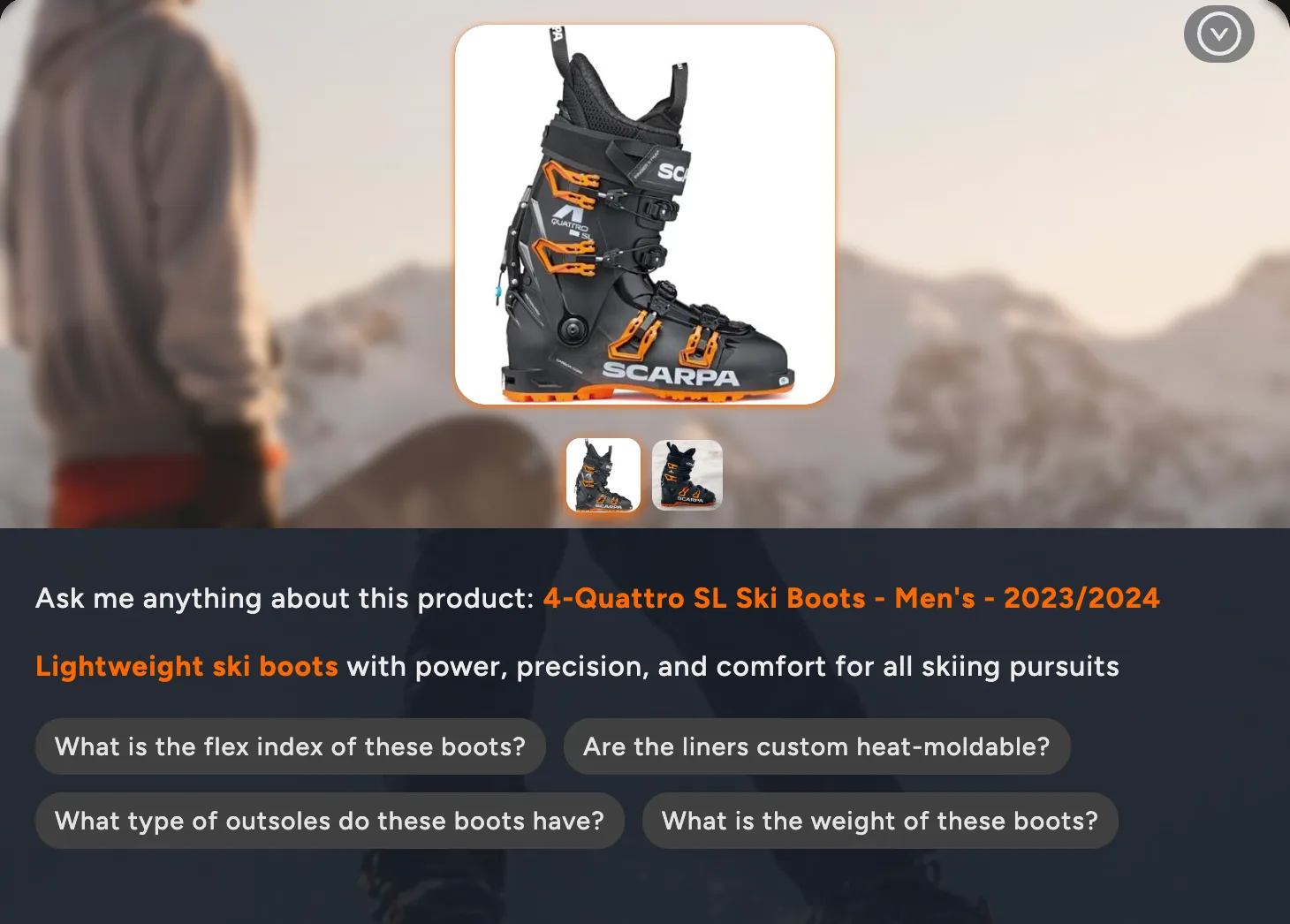
You could add a button like “Questions about this Product?” on the product details page. And when clicking
on it, navigate to anchor: #shoply_product_questions. It will open up our AI chatbot pre-loaded with relevant product FAQ questions,
And the URL would look like this:
https://demo.shoplyai.ai/products/quattro-ski-boots#shoply_product_questionsThis opens the AI chatbot pre-loaded with relevant product FAQs, giving customers instant answers about the specific item they’re viewing.
To add this to your store, follow our guide to add a product-question button.
Automated Product FAQ Questions
When customers click, the AI generates relevant product FAQ questions automatically:
- “What is the flex index of these boots?”
- “What skill level is this designed for?”
- “What is the weight of these boots?”
Customers can click any FAQ question for an instant answer, or type their own question about the product.
The suggested questions relate to the product the shopper is viewing. To understand the information available for answers, see what information Shoply uses, including product descriptions, metafields, and your store’s AI Knowledge.
Product FAQ Implementation Ideas
- Replace static product FAQs: Remove outdated “Product FAQ” sections and use AI instead
- Add a “Have questions about this product?” button that opens intelligent product FAQ
- Include product FAQ links in your product descriptions
- Create targeted ad campaigns that link directly to product Q&A
- Use in abandoned cart emails: “Still have questions about the [Product Name]?”
Dive Deeper in AI Chat from Search Results
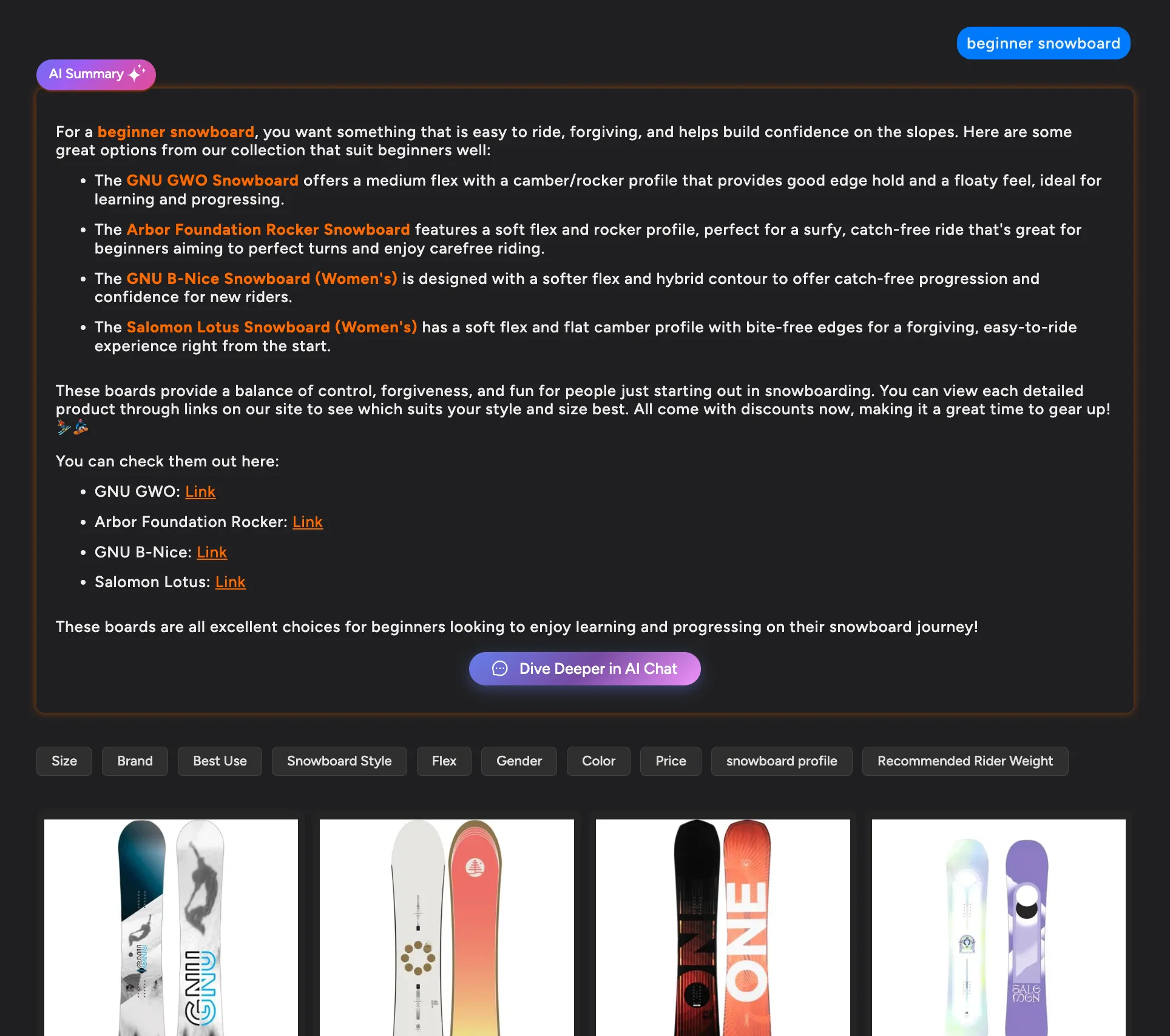
For stores using Shoply AI Search, we’ve added a seamless way to continue the conversation. When customers view search results with an AI Summary, they’ll now see a “Dive Deeper in AI Chat” button.
Why This Matters
Search results are just the beginning. Sometimes customers need more guidance:
- “Which of these would work best for beginners?”
- “Can you compare these two products?”
- “I need something similar but in a different price range”
The “Dive Deeper in AI Chat” button opens the chatbot with the search context already loaded, so customers can ask follow-up questions without starting over.
The Customer Experience
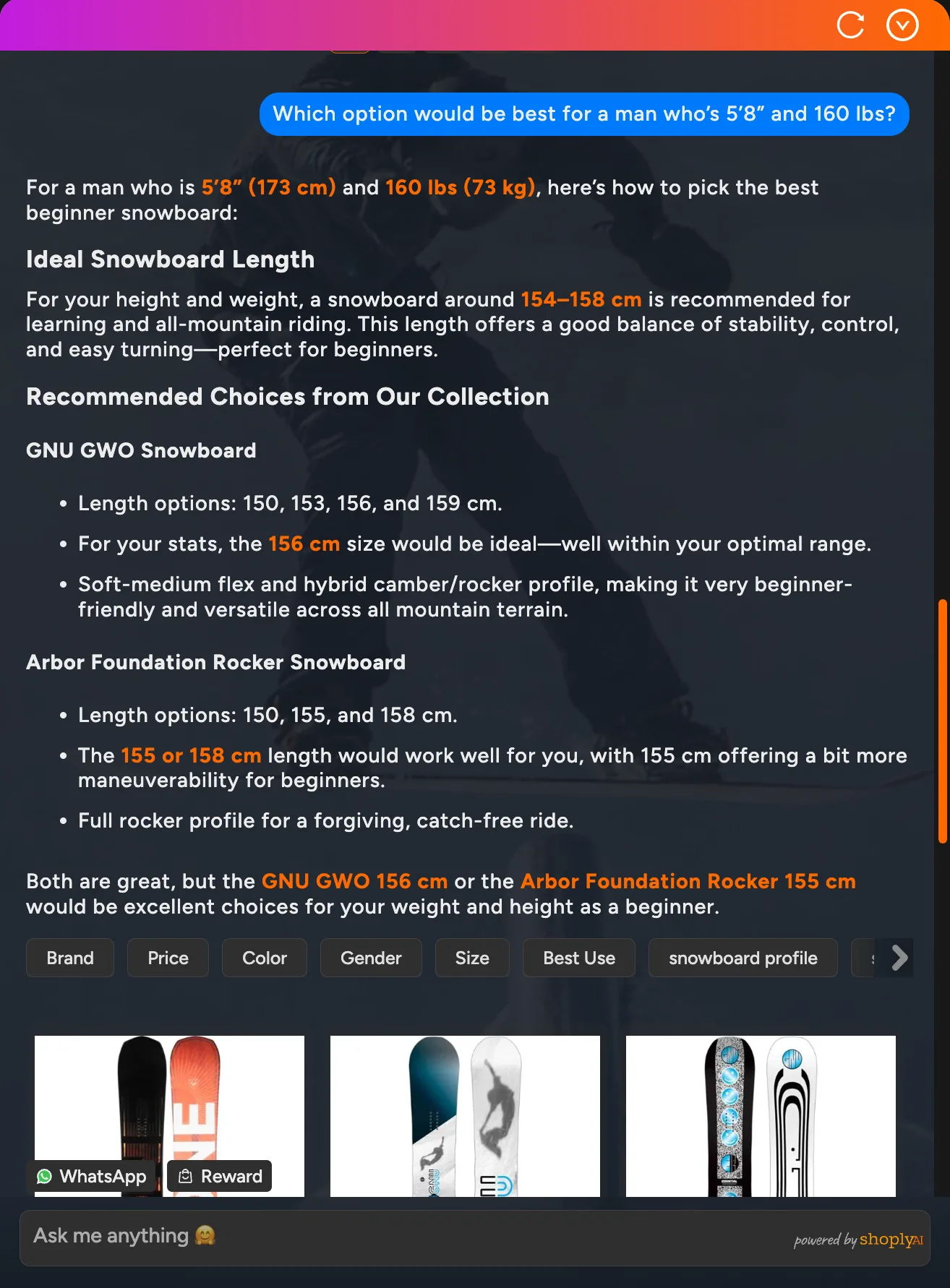
- Customer searches for “beginner snowboard”
- AI Search shows relevant products with an AI Summary
- Customer clicks “Dive Deeper in AI Chat”
- Chatbot opens with context about their search
- Customer can ask: “Which option would be best for a man who’s 5’8” and 160 lbs?”
This creates a natural flow from discovery to conversation, helping customers make confident purchase decisions.
AI FAQ vs Traditional FAQ Page: The Complete Comparison
| Feature | Static FAQ Page | AI FAQ Chatbot |
|---|---|---|
| Updates | Manual, time-consuming | Automatic, real-time |
| Product-specific FAQs | Impossible at scale | Automatic for every product |
| Inventory accuracy | Often outdated | Always current |
| Policy changes | Requires manual updates | Instant reflection |
| Customer questions | Limited to what you anticipated | Handles any question |
| Personalization | None | Context-aware answers |
| Maintenance | Hours per month | Zero maintenance |
Getting Started with AI FAQ
Replace your FAQ page today—these features are available now for all Shoply AI users. No additional setup required!
Quick Reference:
| Feature | Format | Example |
|---|---|---|
| Customer FAQ Link | Hash: #shoply_question=... | #shoply_question=What's your return policy? |
| Product FAQ | Anchor: #shoply_product_questions | On any product page URL |
| Open AI Chatbot | Anchor: #shoply-ai-chatbot | Add to any link |
Need help replacing your FAQ page with AI? Book a meeting with us and we’ll help you create the perfect AI FAQ experience for your store.
AI chatbots do more than replace FAQ pages. See how they increase conversion rates by 15-35% .
Stop Maintaining FAQ Pages Forever
Traditional FAQ pages are a thing of the past. With AI-powered customer FAQ and product FAQ features, you get:
- Zero maintenance: No more updating FAQ pages manually
- Always accurate: Real-time answers based on current inventory and policies
- Every product covered: Automatic product FAQ for your entire catalog
- Better customer experience: Customers get exactly the answers they need
Ready to replace your FAQ page with smart AI? Get started with Shoply AI or try asking a question through the chatbot on this page!
Happy selling!