
Updated
Shopify Support Ticket Reduction: AI Guide (2026)
 Frederick Casey Housand - Mar 13, 2026
Product questions, order status lookups, and policy inquiries make up 50-80% of a typical Shopify store’s support volume, and automating them with an AI chatbot is what cuts total ticket load by 40-60% in the first 30 days. That is not a projection; it is what happens when routine queries get resolved automatically instead of hitting your inbox. This guide breaks down five specific methods to reduce your support ticket volume, each with implementation detail and tool recommendations for Shopify stores of any size.
The core problem is straightforward. Support tickets scale linearly with store growth, but your team does not. Every new product, every seasonal spike, every international customer adds to the queue. Hiring more agents is expensive and slow. A better approach is to resolve the routine questions automatically so your human agents can focus on the complex ones.
Shoply AI handles this by combining AI-powered search and a conversational chatbot in a single Shopify app. It learns from your product catalog, store pages, and policies autonomously, with no manual training required. The result is fewer tickets reaching your inbox and faster answers for your customers.
1. Replace Your Static FAQ Page with an AI Chatbot
Static FAQ pages are one of the biggest sources of avoidable support tickets. They go stale the moment you publish them. Shipping times change, return windows shift with promotions, inventory fluctuates daily, and pricing updates with every sale. But your FAQ page sits there, unchanged, giving customers outdated answers or no answers at all.
The typical outcome is predictable. A customer reads your FAQ, does not find what they need (or finds an answer that no longer applies), and opens a support ticket. That ticket could have been avoided entirely if the answer pulled from live store data instead of a static page written three months ago.
AI chatbots solve this by generating answers dynamically. When a customer asks “what is your return policy?”, the chatbot reads your current policy page and responds with accurate, up-to-date information. When they ask “do you ship to Germany?”, it checks your actual shipping configuration, not a bullet point you may have forgotten to update.
Shoply AI takes this further with zero-setup learning. Once installed, it automatically ingests your product catalog, store pages, blog posts, and policy documents. There is no manual FAQ entry, no decision trees to build, no training data to prepare. It reads what your store already has and uses it to answer questions.
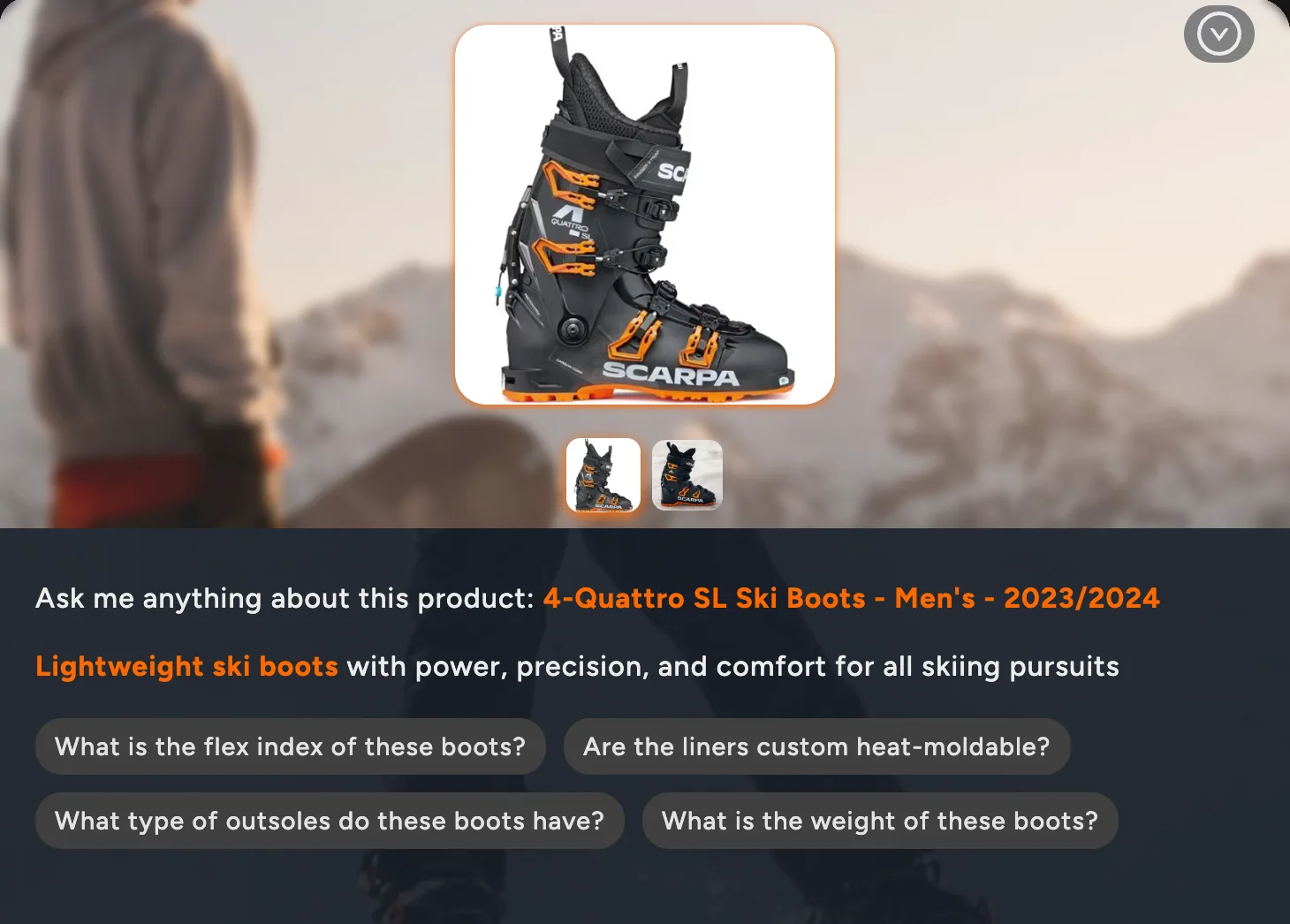
You can also create smart FAQ links using the shoply_question URL parameter. Instead of linking customers to a static FAQ page, link them to yourstore.com?shoply_question=What is your return policy? and the chatbot opens with a dynamic, current answer. This works in email campaigns, QR codes, social media posts, and footer navigation.
For a detailed walkthrough of replacing your FAQ page, see How to Replace Your FAQ Page with a Smart AI Chatbot .
2. Automate Product Questions with AI Search
Pre-purchase product questions make up the largest category of support tickets for most Shopify stores. Common examples include:
- “Do you have this in size 10?”
- “What is the difference between model X and model Y?”
- “Is this compatible with my existing setup?”
These are high-intent questions from customers who are ready to buy, and every hour they wait for a response is an hour they might spend buying from a competitor.
Traditional site search does not help here. Keyword-based search requires customers to guess the exact terms your store uses. Someone searching “waterproof hiking boots for wide feet under $150” will get zero results from most Shopify search bars, even if you stock exactly what they need.
AI-powered search understands natural language queries and matches them against your full product catalog, including attributes, descriptions, tags, and variant data. Customers find what they are looking for without submitting a support ticket, and they find it faster than a human agent could respond.
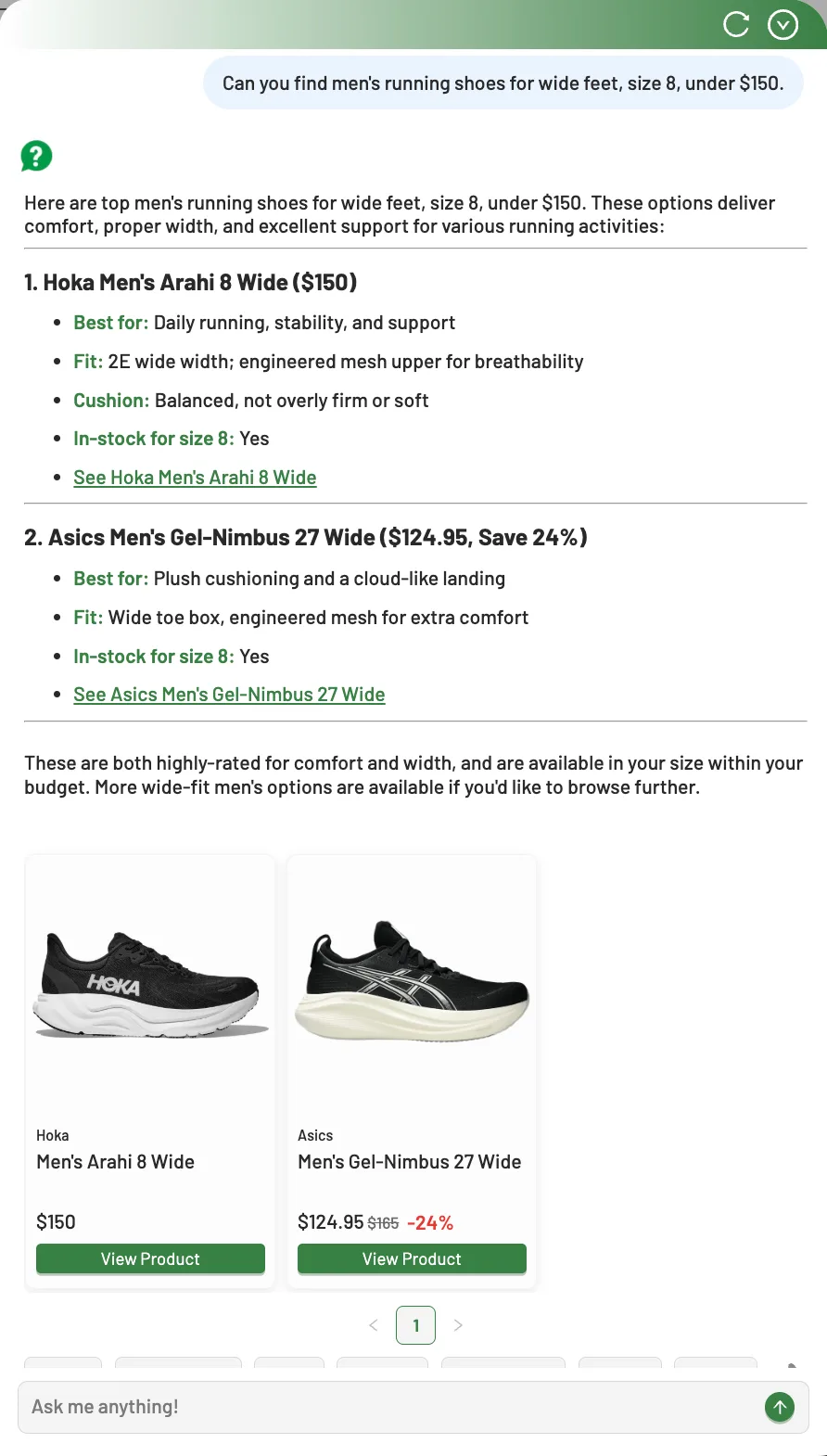
Shoply AI is a Shopify app that combines AI search and an AI chatbot in a single interface. A customer can search for products using natural language, then seamlessly ask follow-up questions in the same conversation. “Show me trail running shoes” followed by “which of these are waterproof?” happens in one continuous interaction, not two separate support tickets.
The search engine handles catalogs of over 1 million products with the same accuracy it delivers for stores with 50 items. For stores with large or complex catalogs, this is the single highest-impact change you can make to reduce pre-purchase ticket volume. For a deep dive on how AI product search prevents support tickets before they form, see our focused guide on the mechanics.
Learn more about how natural language search reduces friction in How AI Search Helps E-commerce Shoppers Find the Right Products Faster .
3. Handle Order Status and Post-Purchase Questions Automatically
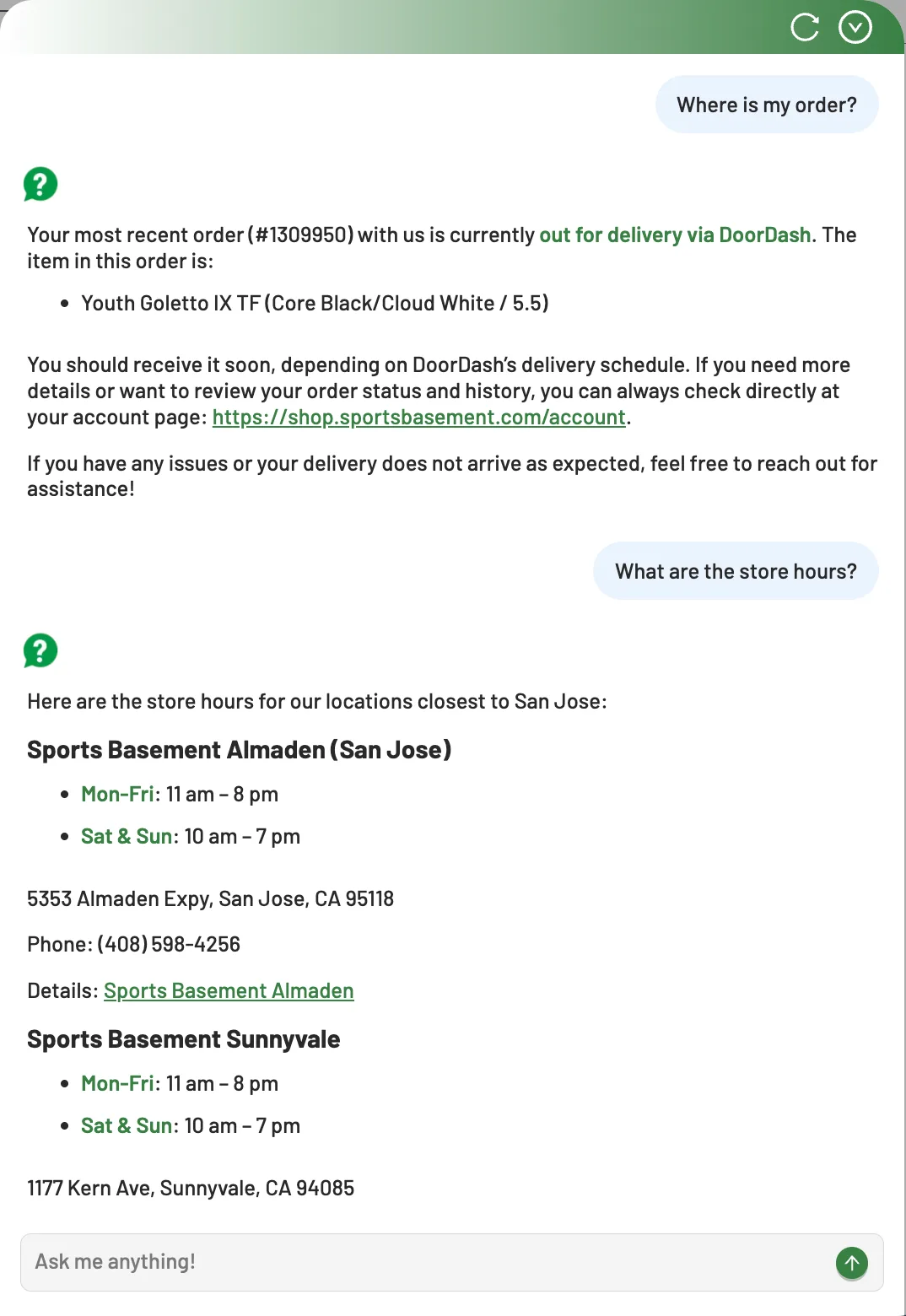
“Where is my order?” is the single most common support ticket for Shopify stores. It is also one of the simplest to automate. AI chatbots integrated with Shopify can pull order data directly and give customers real-time status updates without involving a human agent.
Post-purchase questions extend beyond order tracking. Customers routinely ask about:
- Estimated delivery dates
- How to initiate a return
- Whether they can modify an order
- When out-of-stock items will be available again
Each of these is a routine query with a deterministic answer that does not require human judgment.
Shoply AI addresses the “is this back in stock?” category with its back-in-stock notifications feature. Customers can request notifications for specific products and variants (size, color, style) directly through the chatbot. When the item is restocked, they get notified automatically. This eliminates an entire class of repeat support inquiries. Learn more about this feature in the Smart Back-in-Stock Notifications announcement.
The compound effect matters here. Every post-purchase question that gets answered automatically is a ticket your team does not have to open, read, research, respond to, and close. Across hundreds of orders per week, that adds up to hours of agent time recovered.
For a detailed breakdown of automating these interactions, see Shopify AI chatbot for order status, tracking, and returns.
4. Serve International Customers Without Multilingual Staff
Shopify stores sell globally by default. Your customers are in the US, the Netherlands, Germany, the UK, and dozens of other countries. They ask questions in their own language. Hiring multilingual support staff for every market you sell into is not realistic for most merchants, especially small and mid-size stores.
AI chatbots with automatic language detection handle multilingual support natively. A customer browsing from France gets responses in French. A customer in Japan gets responses in Japanese. No language-specific FAQ pages, no translation workflows, no separate support queues.
Shoply AI supports 23+ languages with automatic detection based on browser settings, URL language codes, and saved customer preferences. The language switching is invisible to the customer. They type their question in their language and get an accurate answer in the same language, generated from your English-language product data and store content.
This is not theoretical. Puffo Sport, an Italian sporting goods retailer using Shoply AI, reports that “most people think they were chatting with a human.” Their customers interact with the chatbot in Italian and get accurate product recommendations and support answers without any manual translation effort from the store’s team.
Sports Basement, a Bay Area sporting goods retailer, uses Shoply AI to handle customer questions across a large catalog and multi-location operation with similar results. Read the full case study: How Sports Basement is Revolutionizing Omnichannel Sales with Shoply AI .
For stores with international traffic, multilingual AI support can eliminate an entire tier of support tickets that would otherwise require bilingual staff or third-party translation services.
5. Use AI for Product Recommendations Instead of Manual Suggestions
Support agents frequently miss cross-sell and upsell opportunities during customer interactions. When a customer asks about a specific product, the agent answers the question and closes the ticket. They rarely suggest complementary products, higher-value alternatives, or accessories that would complete the purchase.
AI chatbots surface relevant product recommendations during every conversation, consistently. When a customer asks about a pair of ski boots, the chatbot can suggest compatible bindings, boot bags, or thermal socks based on the full catalog. When someone inquires about a laptop, it can recommend cases, chargers, or warranty plans.
These suggestions are generated from actual product data and relationships, not from a static upsell script that an agent may or may not remember to use.
This serves a dual purpose for ticket reduction. First, customers who find the right product the first time are less likely to return with exchange requests, complaints about fit, or questions about compatibility. Getting the initial recommendation right prevents downstream tickets.
Second, proactive product discovery during the support interaction means customers do not need to come back with a separate “what else do you recommend?” inquiry.
Shoply AI generates these recommendations using its combined search and chatbot intelligence, drawing from your entire product catalog to surface contextually relevant suggestions in real time. The recommendations improve as the system processes more interactions, and they apply consistently across all 23+ supported languages.
Measuring Your Results
Reducing support tickets is only useful if you can measure the impact. Before implementing any AI tools, establish a 30-day baseline for these metrics:
- Total ticket volume
- First-response time
- Resolution rate
- Customer satisfaction score (CSAT)
These give you a clear before-and-after comparison.
After implementation, track ticket volume weekly. Most stores see the sharpest decline in the first two weeks as the AI handles the routine questions that previously hit the inbox.
Monitor which ticket categories decline (product questions, order status, policy inquiries) and which remain steady (disputes, custom orders, complex returns). The categories that remain are where your human agents add the most value. The same discipline applies to every AI tool you run, not just support: for the feedback loops that get more from the AI you already installed, see the plays that get more from the AI you already run. Use the five limits on customer-service automation to decide where a person belongs. For the shopper journey before a ticket exists, see the Shopify storefront automation guide.
Use Google Search Console to track organic traffic to your support-related content. If customers are finding answers through AI before they reach your support page, you will see changes in search behavior. Shopify analytics can show conversion attribution from chatbot interactions, helping you quantify the revenue impact alongside the cost savings.
For a deeper look at the economics of AI-first support and how to structure your team around automation, see Scaling Shopify Customer Support Without Hiring More Agents.
How Shoply AI Compares
Not all AI support tools are built for Shopify, and not all of them combine search and chat in a single product. Here is how Shoply AI stacks up against common alternatives:
| Feature | Shoply AI | Tidio | Gorgias | Manual Support |
|---|---|---|---|---|
| AI Search + Chatbot combined | Yes | No (chatbot only) | No (helpdesk only) | No |
| Zero-setup learning | Yes | Manual training | Manual rules | N/A |
| Languages supported | 23+ | 16 | Limited | Depends on staff |
| Product catalog limit | 1M+ | Varies | N/A | N/A |
| Built for Shopify badge | Yes | No | Yes | N/A |
| Free plan | Yes (50 chats/mo) | Yes (limited) | No | No |
| Paid plans from | $49.99/mo | $29/mo | $300/mo | $3,000+/mo per agent |
Shoply AI has a 4.9 rating from 23 reviews on the Shopify App Store, checked September 6, 2026, with the Built for Shopify badge indicating it meets Shopify’s highest quality standards. All paid plans include a 14-day free trial.
For a full comparison of AI chatbot options, see Best AI Chatbots for Shopify in 2026 . To score any vendor on the shortlist against the same ten failure modes that show up in real Shopify support data, work through the 10-test evaluation sheet before you commit.
Frequently Asked Questions
How much can AI reduce Shopify support tickets?
Most stores see a 40-60% reduction in routine ticket volume within 30 days of implementing an AI chatbot. The exact number depends on your ticket mix; stores with a high proportion of product questions and order status inquiries see the largest reductions.
Do I need technical skills to set up an AI chatbot on Shopify?
No. Shoply AI learns from your existing product data, pages, and policies automatically after a one-click installation. No coding, manual training, or decision tree configuration is required.
Can AI chatbots handle complex support issues?
AI handles routine queries well: product questions, order status, policies, sizing, and availability. Complex issues like payment disputes, custom orders, and damage claims should still go to human agents. The goal is to automate the 50-80% of tickets that are routine so your team can focus on the rest.
Does Shopify have a built-in chatbot?
Shopify offers Shopify Inbox, a basic live chat and messaging tool. It does not include AI-generated responses, natural language product search, or automatic learning from your catalog and policies. For AI-powered support automation, you need a third-party app like Shoply AI, which installs from the Shopify App Store and works alongside or replaces Inbox.
What is the difference between Shopify Inbox and an AI chatbot?
Shopify Inbox routes messages to human agents and provides canned quick replies. An AI chatbot like Shoply AI generates answers automatically from your product data, policies, and store pages without human involvement. Inbox requires someone to respond; Shoply AI resolves 50-80% of queries on its own, 24/7, in 23+ languages.
How much does an AI chatbot for Shopify cost?
Shoply AI offers a free plan with 50 chats or 150 searches per month. Paid plans start at $49.99/month with a 14-day free trial. This is significantly less than the cost of a single part-time support agent.
Get Started
Try Shoply AI free on the Shopify App Store or see it in action on the live demo store . Setup takes minutes, not days, and there is no manual training required. For more on how chatbots drive revenue beyond support cost savings, see how Shopify chatbots increase conversion rates .