
Shopify AI Chatbot for Order Tracking: Live Status Lookups (2026)
 Frederick Casey Housand - Mar 13, 2026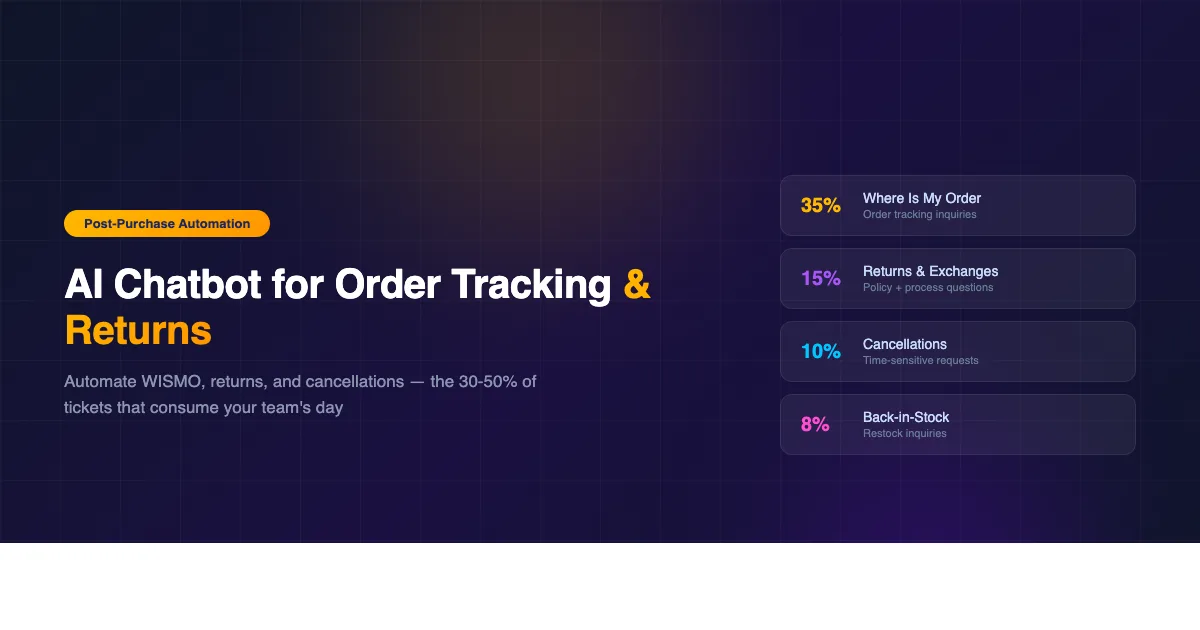
A Shopify order tracking chatbot handles the post-purchase questions that account for 30-50% of all ecommerce support tickets, depending on vertical and order volume. That share is not an outlier. Across verticals and store sizes, the most common questions your support team answers are the same few post-purchase requests:
- “Where is my order?”
- “How do I return this?”
- “Can I cancel?”
They are also the ones that require the least human judgment. Every answer is deterministic: pull the order record, check the status, apply the policy. If a chatbot can do that reliably, your team stops doing it manually dozens of times a day. (Updated: June 2026.)
This article covers how to automate each category of post-purchase support on Shopify, what that looks like in practice with Shoply AI, and how the math on agent time savings adds up quickly. Our analysis of 23,000 chatbot conversations found these post-purchase questions routinely surface inside pre-purchase sessions, so routing them to a separate queue costs sales. For a broader look at reducing your total ticket volume, see the parent guide: How to Reduce Shopify Customer Support Tickets with AI: 5 Proven Methods.
Why Post-Purchase Questions Are the Highest-ROI Tickets to Automate
The case for automating post-purchase support starts with volume. If your store ships 50 orders per day and even 20% of customers contact support about their order, that is 10 WISMO tickets daily. At 5 minutes per ticket, that is 50 minutes of agent time, every day, on a single question type. Across a month, you are looking at roughly 17 hours spent confirming order statuses that Shopify already knows.
Now add returns. Return inquiries typically run 10-15% of orders for apparel and home goods stores. Add cancellation requests, back-in-stock inquiries, and “can I change my shipping address?” questions, and post-purchase support can consume the majority of a small team’s working hours. None of these interactions require experience, product expertise, or judgment. They require access to order data and a copy of your policies.
That is exactly what a Shopify-integrated AI chatbot provides. Because Shoply AI connects directly to your Shopify Admin and Checkout data, it reads live order records rather than a static FAQ answer. A customer who asks “Where is my order?” gets the actual tracking status for their specific order number, not a generic instruction to check their confirmation email.
The practical result is that agents spend their time on tickets that actually need them: payment disputes, damaged items, custom requests, and edge cases that fall outside policy. The volume of routine post-purchase tickets reaching the inbox drops sharply, and with it, the daily overhead of answering the same questions repeatedly.
Handling “Where Is My Order?” at Scale
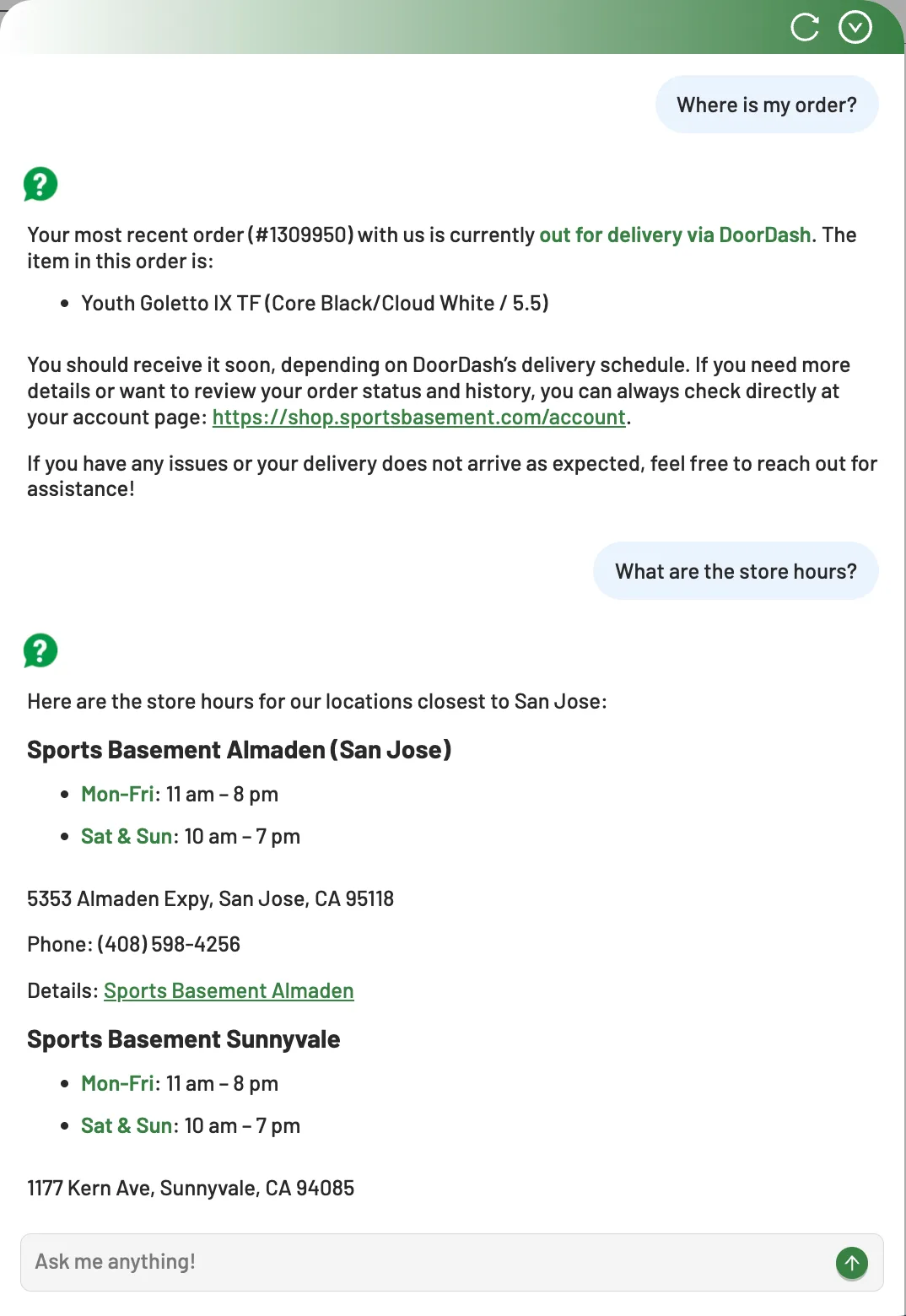
WISMO is the canonical post-purchase ticket category, and it is worth treating it specifically because the mechanics of automating it are straightforward once you understand what the chatbot needs access to. The chatbot must be able to identify the customer (by email, order number, or Shopify account session), query the correct order record, and return status information in plain language. How that exchange unfolds turn by turn, from intent to resolved answer, is mapped in the anatomy of a Shopify chatbot conversation .
The answer then includes the current fulfillment status, the carrier and tracking number if available, and the estimated delivery window.
Shoply AI handles this through its native Shopify Admin integration. When an authenticated customer asks about their order, the chatbot retrieves the order data directly and responds with current tracking information. No human lookup required. No copy-pasting from Shopify’s order list into an email.
The volume impact is measurable. If you eliminate even 60% of WISMO tickets through automation, a store handling 30 of those tickets per week recovers 18 responses worth of agent time, roughly 1.5 hours at 5 minutes per ticket. That compounds across every week of the year and accelerates during peak seasons when ticket volume spikes and hiring additional agents is not feasible on short notice.
Automating Return Initiation and Policy Lookups
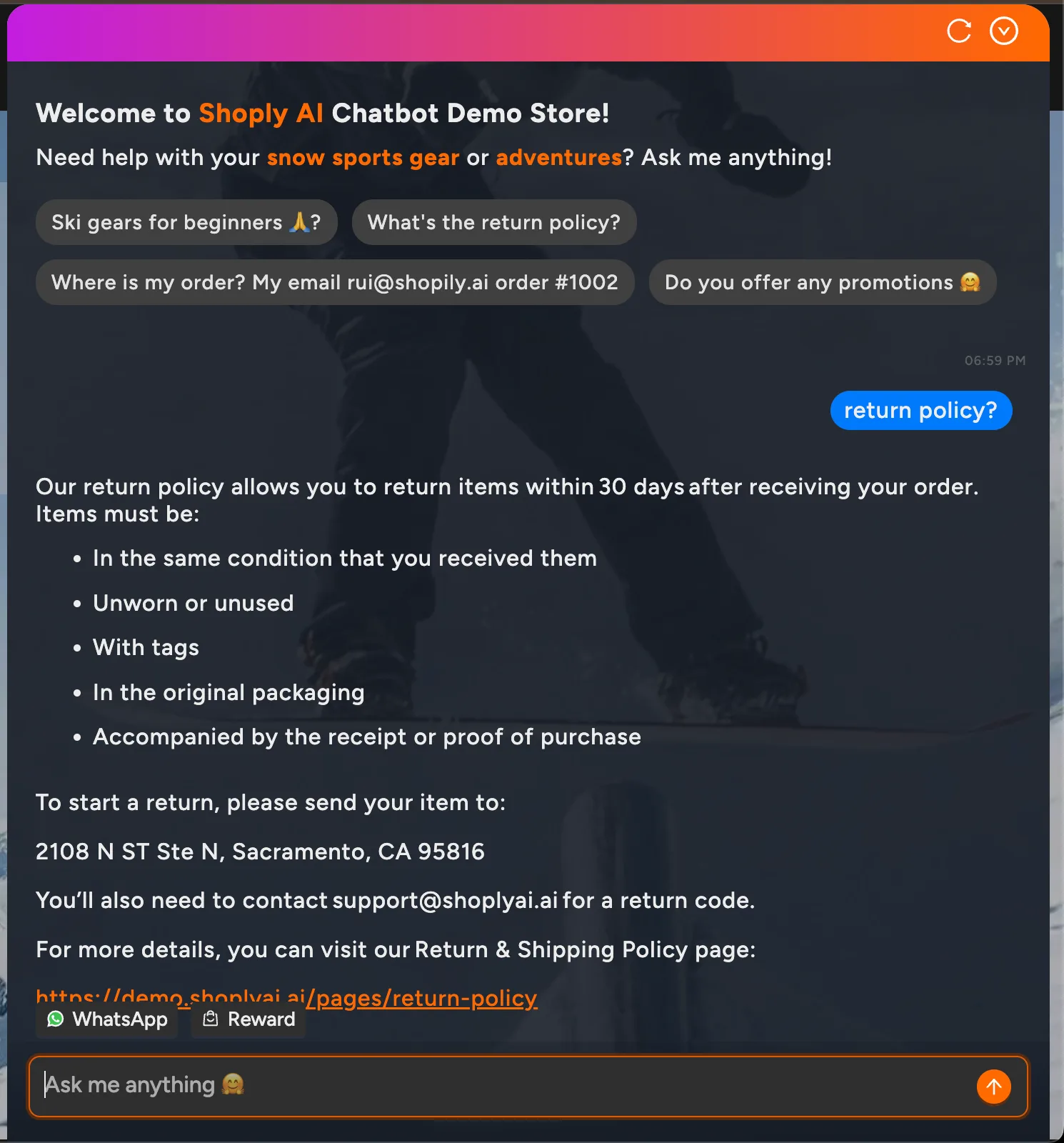
Return questions come in two forms. The first is a policy question: “What is your return window?” or “Do you accept returns on sale items?” The second is a process question: “How do I start a return?” or “Where do I send this?” Both are answerable without a human agent, and both contribute meaningfully to ticket volume.
Static FAQ pages handle these poorly. Return policies change. A holiday extension gets added in November and forgotten in the FAQ in January. A new category of items gets made non-returnable, but the FAQ still says all items qualify. The mismatch between static FAQ content and live policy is a reliable source of customer frustration and escalated tickets.
Shoply AI generates return policy answers dynamically from your current policy pages, not from cached text that may be out of date. When a customer asks about returns, the chatbot reads the policy document as it exists now and responds accordingly. If you update your policy page, the chatbot’s answers update with it automatically, with no manual retraining needed.
For the process side of return initiation, Shoply AI can walk customers through the return steps using the same zero-setup learning that applies to product questions. It reads your returns process documentation and translates it into a conversational interaction. Customers get clear instructions without waiting for a response from your team. For a broader look at how AI handles FAQ-style queries better than static pages, see How to Replace Your FAQ Page with a Smart AI Chatbot .
Managing Cancellation Requests and Order Modifications
Cancellation requests are time-sensitive by nature. A customer who wants to cancel an order before it ships has a short window, and if they cannot reach support quickly, they may initiate a chargeback instead. An AI chatbot that can check order status and communicate your cancellation policy instantly reduces both the frustration and the downstream financial risk.
Follow the setup guide to enable order cancellation and review the verification flow.
The chatbot cannot process a cancellation in Shopify Admin autonomously without explicit configuration to do so. What it can do reliably is:
- Check whether an order is still in a cancellable state
- Communicate your cancellation window and policy
- Direct the customer to the appropriate next step, whether that is a self-service cancellation link or a priority escalation to a human agent
This alone removes the most time-sensitive part of the cancellation workflow from the human queue and gives the customer a faster first response.
Order modification requests follow a similar pattern. “Can I change the size?” or “Can I update my shipping address?” are questions with policy-driven answers. The chatbot communicates what is and is not possible based on your current rules, and routes genuinely complex requests, those where a human actually needs to act in Shopify Admin, to your team with the relevant context already captured.
That handoff context captures everything the agent needs upfront:
- The order number
- The specific modification requested
- The customer’s stated urgency
This saves the agent the time they would have spent gathering it from the customer themselves.
Eliminating Back-in-Stock Inquiries Before They Become Tickets
A category of post-purchase support that gets less attention is the out-of-stock inquiry. “When will this be back in stock?” is not technically a post-purchase question, but it follows the same pattern: a customer who already knows your store and has purchase intent, asking a question with a deterministic answer that does not require human judgment.
Without automation, these inquiries generate tickets that are impossible to resolve at the time of asking. Your agent writes back “we do not have a restock date” or “we will notify you,” neither of which is satisfying or reliable. The customer either moves on or sends follow-up tickets when the wait extends.
Shoply AI’s back-in-stock notifications feature solves this at the source. Through the chatbot interface, customers can subscribe to restock alerts for specific products and variants, a particular size, color, or configuration, not just a general product page. When inventory is updated in Shopify, the notification goes out automatically. The customer gets an accurate alert; your team never opens a ticket about it.
Sports Basement , a Bay Area sporting goods retailer using Shoply AI, benefits from this kind of omnichannel inventory integration across their store. When customers ask about specific product availability, the chatbot surfaces real inventory data rather than directing them to a generic “notify me” email form. For more on how AI handles the full spectrum of support cost reduction, see the guide on scaling Shopify support without hiring.
Frequently Asked Questions
Does a Shopify order tracking chatbot work for guests who did not create an account?
Yes. Shoply AI can retrieve order information using an order number and email address combination, which is what most customers have from their confirmation email. Authenticated account holders get a more streamlined lookup, but guest checkout customers are not excluded.
Will the chatbot give customers wrong information about their order status?
No. Shoply AI pulls live data from your Shopify Admin, so the status it returns reflects what Shopify actually shows. IPcam-shop, a Netherlands-based retailer using Shoply AI, notes that “answers are 100% correct.” The accuracy depends on your fulfillment workflow keeping Shopify updated, which is standard practice for any store with carrier integration.
Can the chatbot process refunds or cancellations directly?
Not autonomously by default. The chatbot handles the information and routing side of cancellation and return requests: checking order status, communicating policy, and directing the customer to the correct next step. Actual order modifications in Shopify Admin remain with your team unless you configure additional automation.
How many languages does the Shoply AI chatbot support for post-purchase queries?
Shoply AI supports 23+ languages with automatic detection. A customer asking “Wo ist meine Bestellung?” in German gets the same order tracking response as an English speaker, drawn from the same live order data, without any additional configuration on your part.
Get Started
Automate your highest-volume support tickets and recover hours of agent time each week. Try Shoply AI free on the Shopify App Store or see how post-purchase queries are handled on the live demo store . All paid plans include a 14-day free trial, and setup requires no manual training. For the full playbook on reducing Shopify support costs, return to the parent guide: How to Reduce Shopify Customer Support Tickets with AI.