
Updated
Shoply AI Can Now Cancel Orders: A First Step Toward Agentic E-Commerce
 Rui Jiang - Apr 27, 2026
Until now, Shoply AI has been great at answering common questions — product recommendations, order status, store policies, FAQs. Today, we are taking a leap forward. Shoply AI can now cancel orders on behalf of your customers, directly through the chat widget on your store.
This is more than a new feature. It is our first step toward full agentic e-commerce — where an AI assistant does not just answer questions, but takes real actions to resolve customer issues end-to-end. Order cancellation is the beginning: a safe, high-demand action that saves your support team time and gives your customers instant resolution.
How to Enable Order Cancellation
Enabling this feature takes just a few steps in your Shopify admin and the Shoply AI settings panel.
Step 1: Approve Updated App Permissions
Order cancellation requires write access to orders on your Shopify store. If you installed Shoply AI before this update, you will need to approve the updated app permissions.
- Open your Shopify Admin
- Go to Settings > Apps > Shoply AI
- You will see a prompt to approve updated permissions — click Approve to grant
write_ordersaccess - After approving, please allow up to 24 hours for the new permission to take effect on our end.
If you are installing Shoply AI for the first time, this permission is included in the install flow automatically.
Step 2: Enable Order Cancellation in Shoply AI Settings
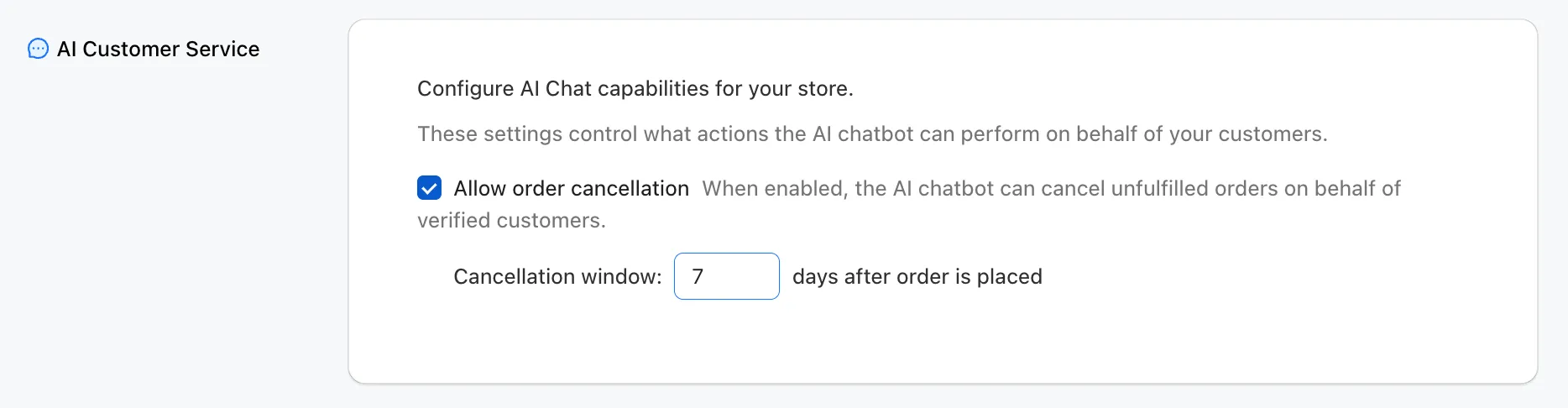
- Open the Shoply AI admin panel on Shopify
- Go to Settings > AI Customer Service
- Toggle Allow order cancellation on
- Optionally, adjust the cancellation window — the number of days after an order is placed during which customers can cancel. The default is 7 days.
That is it. Once enabled, the AI chatbot will automatically offer cancellation as an option when a customer asks about cancelling their order.
How It Works: The Cancellation Flow
Here is what a real order cancellation looks like from the customer’s perspective. The entire flow happens inside the chat widget — no page redirects, no support tickets, no waiting.
1. Customer asks to cancel
The customer tells the chatbot they want to cancel an order. The chatbot asks for their email address and order ID (e.g. #1001).
2. Order lookup and verification
The chatbot looks up the order and confirms the details with the customer — product name, order date, fulfillment status. Before proceeding, the chatbot sends a verification code to the customer’s email to confirm their identity.
Our data FAQ explains how customers verify order access.
3. Customer provides the verification code
The customer checks their email and provides the 6-digit code back to the chatbot.
4. Cancellation confirmed
Once verified, the chatbot cancels the order and confirms that a refund will be issued to the original payment method.
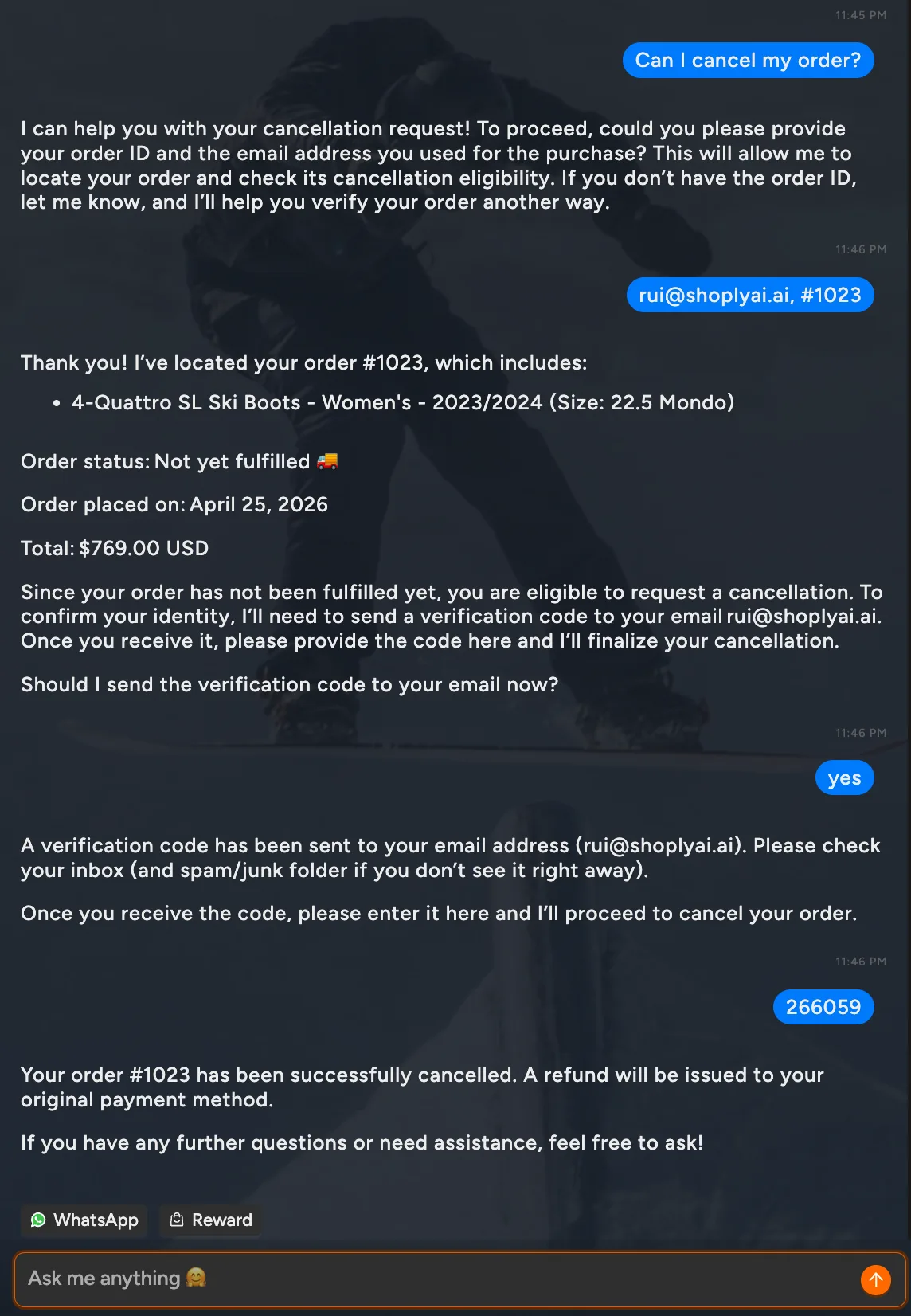
The entire process takes under a minute. No human agent needed.
Safety and Guardrails
We built this feature with safety in mind:
- Identity verification — A verification code is sent to the customer’s email before any cancellation is processed. This prevents unauthorized cancellations.
- Configurable time window — Store owners control how many days after purchase a customer can cancel (default: 7 days). Orders outside this window are directed to contact the store.
- Fulfillment check — Only unfulfilled orders can be cancelled. We only look at Shopify’s
displayFulfillmentStatus[1] for an order, and we only cancel the order if its status isUNFULFILLED. Orders with any other status, such asON_HOLD,IN_PROGRESS,PARTIALLY_FULFILLED, orFULFILLED, are not cancelled; the chatbot lets the customer know and suggests contacting the store directly. - Store owner opt-in — This feature is off by default. You choose when to enable it.
What is Next
Order cancellation is just the beginning. We are building toward a future where Shoply AI can handle more post-purchase actions — order modifications, return initiation, exchange requests — so your customers get instant resolution and your support team can focus on the cases that truly need a human touch.
You can also handle order tracking and return questions through the broader order-support workflow.
If you are already using Shoply AI, head to Settings > AI Customer Service to enable order cancellation today. If you are new, install Shoply AI from the Shopify App Store and get started in minutes.
References
[1] Shopify Admin GraphQL API, OrderDisplayFulfillmentStatus.