
Inside Shoply AI Search: How Product Metadata Becomes Smart Filters
 Frank Yang - Sep 6, 2026
Shoply AI Search turns product metadata into smart filters for the shopper’s search session. It looks at the details on matching products, uses powerful AI models from ChatGPT, DeepSeek, or Claude to choose relevant filter categories, and builds the available choices from product data. Shopify store owners do not need to manually configure each filter. The catalog supplies the information; the shopper’s search query gives it context.
For the next stage of the search, see how Shoply ranks matching products.
1. What is metadata?
Metadata is information that describes a product beyond its name: its material, dimensions, intended use, connection type, or other specifications. On Shopify, Shopify store owners can store extra details in metafields, part of Shopify’s custom data system .
Think of an online fashion store selling dresses. A product description might suggest how to style a dress, while separate fields record its fabric, fit, and occasion—details shoppers can use to find something right for them.
Each field has a name and a value. For a summer dress, “Fabric” might contain “Linen,” “Fit” might contain “Relaxed,” and “Occasion” might contain “Casual.” These details describe the dress as a whole, while individual versions can have their own size and color values.
This structure gives search something specific to work with. Instead of treating a specification only as words inside a description, Shoply can use the field and its values as possible choices for narrowing search results.
Useful metadata describes differences shoppers care about, so you should carefully design and maintain metadata.
2. How Shoply uses metadata to generate filters
You can also style the search results around your filters to match your storefront.
Shoply chooses smart filters in the context of a search, using product information already prepared in its search index—the stored catalog data it searches. It does not need to read the whole store from Shopify again whenever a shopper types a query. Avoiding those repeated catalog requests helps keep Shoply AI Search fast and responsive.
The process connects three things: what the shopper asks, which products are found, and which attributes those products actually contain.
-
Find possible filter fields in the matching products. After finding candidate products, Shoply gathers their available attributes and values.
-
Ask our fine-tuned LLM models which filters fit this search. Shoply gives the models the search keywords and potential filter names and values. The models select relevant filter categories and order them by importance.
-
Build the choices from result data. Once filter categories have been selected, Shoply assembles their options and product counts from the results, respecting exclusions set by Shopify store owners.
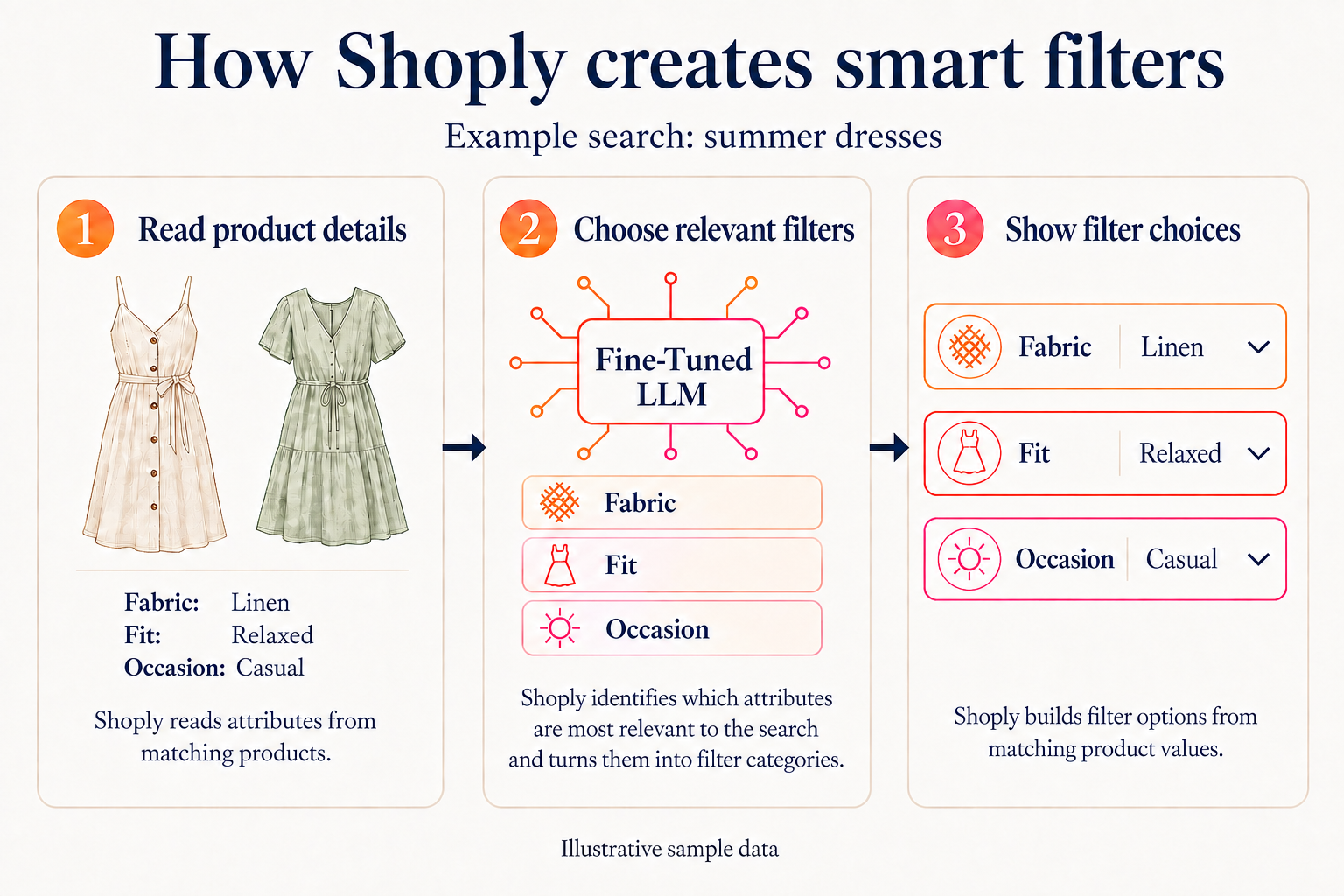
See smart filters in action—try a search in the demo store .
For an illustrative search such as “outdoor cameras,” attributes about installation or power connection could offer useful ways to narrow the selection—if those details exist in the matching products and are selected as relevant. A different search can lead to different filters. Shoply does not promise the same camera-filter list for every query.
This is what makes the filters query-specific: their selection depends on the shopper’s request and the available product information, rather than only a fixed menu configured beforehand.
For Shopify store owners, the benefit is less manual filter setup. You maintain meaningful product information, and Shoply uses it to decide which choices to offer. You still have controls to hide unwanted filters or exclude fields that should not participate.
3. Please clean up filters regularly!
Automatically generated filters make catalog maintenance more important, not less. If an outdated value remains attached to a product, it can still become a filter choice.
If you are setting this up for the first time, enable AI Search in your store before tuning the filters.
We saw this with a security-camera retailer. Old specifications appeared in the filters even though the Shopify store owner thought they had been removed. When we checked the Shopify product data, the values were still saved in metafields whose definitions were missing.
In the security-camera retailer’s case, a metafield definition describes the field; it is separate from the value stored on a product. Shopify allows a definition to be deleted while retaining its associated values. Removing the definition alone is therefore not proof that the data is gone. Shopify documents this deletion behavior here .
The Shopify store owner found and removed the old fields, then reported that the experience was much better. This was customer feedback, not a measured test of search quality or sales.
When reviewing your filters, check the product information behind them:
- Remove obsolete values. Check products and individual product versions for details left over from old imports, including fields without definitions.
- Keep names and units consistent. Use clear attribute names and a consistent way of recording measurements and options. This gives Shoply clearer choices to work with.
- Hide a filter when the underlying information is still useful. The
blacklist_display_filterssetting removes specified fields from the visible filter choices without excluding them from other uses. - Exclude information Shoply should not use. Use
blacklist_product_fieldsfor specific fields orblacklist_namespacesfor named groups of fields. Previously indexed values need an index refresh to be removed from stored search data. - Refresh and check again. After source-data cleanup, have the search index refreshed and repeat typical customer searches. Look at the filter categories, their values, and the products they help shoppers find.
The metafield configuration guide explains these controls. If you prefer results without a filter bar, open Shopify admin → Shoply AI → Customize AI Search → Search filters, turn off Show filters in search results, and save. See Hide Search Filters for details. This hides the bar; it does not stop Shoply from using product attributes to understand searches and order results.
AI can assess whether a field looks relevant to a search. It cannot reliably know that a plausible product specification came from an obsolete import. Keep the source information accurate, and review what shoppers actually see.