
如何使用 Shoply Merchant API

Shoply Merchant API 可讓商家在報表工具、支援流程、排程匯出,以及私人商務應用程式中,安全地使用自己的 Shoply 資料。
每個整合都會使用在 Shoply Settings 中建立、可撤銷且限定店鋪範圍的憑證進行驗證。您不需要分享 Shopify Admin API 存取權杖,而且每個整合只能存取發出該憑證的店鋪。
我可以用 Merchant API 做什麼?
您可以使用 Merchant API 來:
- 將每日、每週或每月的成效結果匯出到試算表或資料倉儲。
- 建立私人儀表板,查看工作階段、聊天、搜尋、商品點擊、加入購物車事件、購買與歸因營收。
- 監控顧客活動,並發現互動上的異常變化。
- 檢視聊天與搜尋工作階段,用於客服、商品管理與答案品質相關工作。
- 在調查顧客問題時,擷取個別對話的時間軸。
- 建立、更新、列出及刪除 Shoply AI 使用的自訂知識。
- 將外部網頁或上傳的 PDF、文字或 Markdown 檔案加入知識庫。
- 將 UTC 事件資料對齊店鋪的本地時區。
本指南記錄七個端點。其中五個與 Shoply Admin → Analytics 使用的是相同端點,另外兩個則用於管理知識庫:
| API | 類別 | 回傳內容 |
|---|---|---|
admin_store_analytics | 成效 | 每日、每週或每月的成效資料列與總計 |
query_api_usage_count | 互動 | 依 UTC 分鐘或日期分組的活動計數 |
query_sessionized_chat | 對話 | 聊天與搜尋工作階段摘要 |
query_log_visualization | 對話 | 單一選定工作階段的完整事件時間軸 |
admin_get_store_metadata | 店鋪設定 | 用於正確顯示 UTC 資料的店鋪時區 |
admin_store_knowledge | 知識 | 自訂文字、外部頁面、上傳檔案、刪除與重新爬取 |
user_generated_file | 知識檔案 | 在註冊為知識前先上傳 PDF、文字或 Markdown 檔案 |
以下回應內容為代表性範例。您的欄位與數值會反映您店鋪所記錄的實際活動。
部署需求: 您呼叫的 API 伺服器必須已部署店主密鑰驗證機制。若有效密鑰回傳 HTTP
403並顯示No access_token found,表示該伺服器仍在執行較舊、僅支援 access token 的驗證程式碼。
如何建立 API 密鑰?
- 開啟您的 Shoply AI 管理後台。
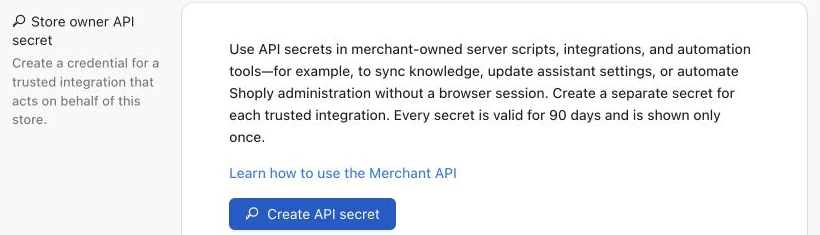
- 前往 Settings → Store owner API secret。
- 建立一組密鑰,並為其命名以識別該整合,例如
Weekly reporting export。 - 在密鑰出現時立即複製。Shoply 只會顯示一次明文值。
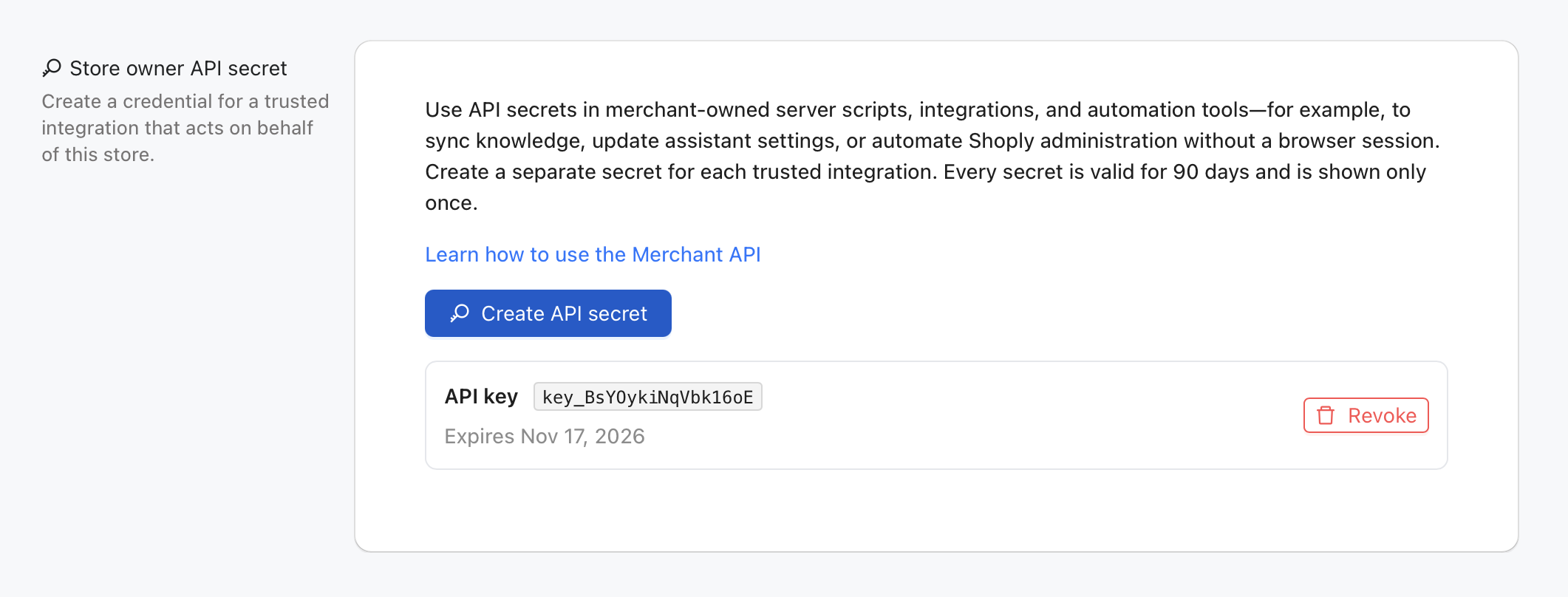
每組密鑰的有效期為 90 天。單一店鋪可為不同整合建立不同密鑰,您也可以撤銷其中一組而不影響其他整合。
請將以下值儲存為伺服器端環境變數:
export SHOPLY_STORE_KEY="your-store.myshopify.com"
export SHOPLY_STORE_OWNER_API_SECRETE="shoply_owner_key_example123.secret-value"
SHOPLY_STORE_KEY 請使用店鋪固定的 myshopify.com 網域,即使顧客平常造訪的是自訂網域也一樣。
驗證機制如何運作?
每個 Merchant API 請求都會傳送一個 Authorization 標頭,其值為 JSON 字串:
{
  "store_key": "your-store.myshopify.com",
  "store_owner_api_secrete": "YOUR_STORE_OWNER_API_SECRET"
}
store_owner_api_secrete 是精確的公開欄位名稱,包含其歷史拼字。這不是 Bearer token。請直接將完整 JSON 字串放入 Authorization 標頭中。
請僅在後端程式碼中保存此密鑰。不要將它放在 URL、瀏覽器 bundle、公開儲存庫、分析事件或應用程式日誌中。
有官方的 Python 與 Node.js 套件嗎?
有。Shoply 發布了兩個伺服器端套件,會自動加入所需驗證,並以型別化函式方式提供 Merchant API。兩個套件皆以開源形式發布於 shoplyai-public GitHub 組織下。
Python 套件
shoply-merchant-api 套件支援 Python 3.12,並使用 Pydantic v2 回應模型。請安裝固定版本 2.1.3:
python3.12 -m venv .venv
source .venv/bin/activate
python -m pip install "git+https://github.com/shoplyai-public/shoply-merchant-api.git@v2.1.3"
以下示範擷取最新的聊天與搜尋工作階段,並以型別化的 SessionSummary 模型回傳:
import os

from shoply_merchant_api import ShoplyMerchantClient


with ShoplyMerchantClient(
    store_key=os.environ["SHOPLY_STORE_KEY"],
    api_secret=os.environ["SHOPLY_STORE_OWNER_API_SECRETE"],
) as shoply:
    session_response = shoply.list_sessions(limit=40)

for conversation in session_response.data:
print(conversation.customer_id, conversation.user_questions)此套件也提供分析資料、活動計數、完整工作階段時間軸、店鋪時區與知識管理等函式。請參閱其商務使用情境指南 與 API 參考文件 。
Node.js 與 TypeScript 套件
shoply-merchant-api-js 儲存庫提供 @shoplyai/merchant-api 套件,適用於 Node.js 20 以上版本。它是 ESM 套件,內建 TypeScript 宣告,且沒有執行期相依套件。請直接從 GitHub 安裝固定版本 2.1.3:
npm install "github:shoplyai-public/shoply-merchant-api-js#v2.1.3"以下示範從 Node.js 伺服器擷取相同的最新工作階段:
import { ShoplyMerchantClient } from "@shoplyai/merchant-api";

const storeKey = process.env.SHOPLY_STORE_KEY;
const apiSecret = process.env.SHOPLY_STORE_OWNER_API_SECRETE;
if (!storeKey || !apiSecret) {
  throw new Error("SHOPLY_STORE_KEY and SHOPLY_STORE_OWNER_API_SECRETE are required");
}

const shoply = new ShoplyMerchantClient({
  storeKey,
  apiSecret,
});

const sessionResponse = await shoply.listSessions({ limit: 40 });

for (const conversation of sessionResponse.data) {
  console.log(conversation.customer_id, conversation.user_questions);
}
此 npm 套件涵蓋與 Python 套件相同的 Merchant API 端點。請參閱其商務使用情境指南 與 API 參考文件 。
這兩個套件皆適用於受信任的後端服務、排程工作與私人內部工具。請勿將任一套件匯入店面前端程式碼,也不要在瀏覽器 bundle 中暴露 API 密鑰。
不使用套件也能直接呼叫 HTTP API 嗎?
可以。Merchant API 仍然是標準的 HTTPS API。以下較底層的 Python 範例使用 Requests,讓您能看見完整的通訊協定內容,或從其他語言進行整合。
如果您的環境尚未包含 Requests,請先安裝:
python -m pip install requests以下輔助函式會在每個請求中加入 store key 與驗證標頭:
import json
import os
from typing import Any

import requests

BASE_URL = "https://api.shoplyai.ai"
STORE_KEY = os.environ["SHOPLY_STORE_KEY"]
STORE_OWNER_API_SECRETE = os.environ["SHOPLY_STORE_OWNER_API_SECRETE"]

session = requests.Session()
session.headers.update({
    "Authorization": json.dumps({
        "store_key": STORE_KEY,
        "store_owner_api_secrete": STORE_OWNER_API_SECRETE,
    })
})


def shoply_get(api_name: str, **params: Any) -> dict[str, Any]:
    """Call one store-scoped Shoply API and surface HTTP or API-level errors."""
    response = session.get(
        f"{BASE_URL}/{api_name}",
        params={"store_key": STORE_KEY, **params},
        timeout=30,
    )
    response.raise_for_status()

    payload = response.json()
    if payload.get("error") is not None or payload.get("statusCode") not in (None, 200):
        raise RuntimeError(payload.get("error", "Shoply API request failed"))
    return payload


def shoply_post(
    api_name: str,
    payload: dict[str, Any] | None = None,
    **params: Any,
) -> dict[str, Any]:
    """Write store-scoped data and surface HTTP or API-level errors."""
    response = session.post(
        f"{BASE_URL}/{api_name}",
        params={"store_key": STORE_KEY, **params},
        json=payload,
        timeout=60,
    )
    response.raise_for_status()

    result = response.json()
    if result.get("error") is not None or result.get("statusCode") not in (None, 200):
        raise RuntimeError(result.get("error", "Shoply API request failed"))
    return result
以下範例都會使用這個共用 client。兩個輔助函式都會自動加入已驗證的 store key。
我可以透過 API 管理 Shoply AI 知識嗎?
可以。admin_store_knowledge 使用 GET 來擷取知識,並使用 POST 來建立、更新、刪除或重新爬取知識。若 POST 使用既有知識 ID,則會更新該項目;若使用新 ID,則會建立新項目。
在自動化更新前,請先參考我們訓練指南中的範例,規劃有用的店鋪知識。
知識寫入可能會改變顯示給顧客的答案。請為管理知識的系統使用專用密鑰,在送出前驗證內容,且絕不可在店面 JavaScript 中暴露此具寫入能力的憑證。
列出現有知識
knowledge_payload = shoply_get(
    "admin_store_knowledge",
    knowledge_id_to_retrieve="_ALL_",
)

for knowledge_id, knowledge in knowledge_payload["data"].items():
    print(knowledge_id, knowledge.get("title"))
範例回應
{
  "data": {
    "knowledge::shipping-policy": {
      "title": "Shipping policy",
      "text": "Orders leave our warehouse within two business days.",
      "epoch_edit": 1787211246
    }
  }
}
建立或更新自訂文字知識
請選擇穩定且唯一的知識 ID。更新該項目時請重複使用相同 ID。
from time import time

knowledge_id = "knowledge::shipping-policy"
result = shoply_post(
    "admin_store_knowledge",
    {
        knowledge_id: {
            "title": "Shipping policy",
            "text": (
                "Orders leave our warehouse within two business days. "
                "Standard delivery normally takes three to five business days."
            ),
            "epoch_edit": int(time()),
        }
    },
)

print(result)
範例回應
{
  "statusCode": 200
}
成功回應表示知識已儲存。搜尋索引可能需要幾分鐘,因此新答案不一定會立即出現。若 API 回報內容已儲存但索引延遲,請先用 GET 確認已儲存的項目,再重試寫入。
新增外部網頁
請使用以 external_url:: 開頭的 ID。將完整的 http:// 或 https:// URL 放在 text 中。
from time import time

result = shoply_post(
    "admin_store_knowledge",
    {
        "external_url::returns-policy": {
            "title": "Returns and exchanges",
            "text": "https://www.example.com/policies/returns",
            "epoch_edit": int(time()),
        }
    },
)
上傳並註冊知識檔案
知識檔案必須是 PDF、TXT 或 Markdown,且小於 5 MB。請先上傳檔案,再將回傳的私有 S3 位置儲存為知識項目。
from pathlib import Path
from time import time

file_path = Path("shipping-policy.md")
with file_path.open("rb") as file_handle:
    upload_response = session.post(
        f"{BASE_URL}/user_generated_file",
        params={"store_key": STORE_KEY, "folder": "knowledge_file"},
        files={"file": (file_path.name, file_handle, "text/markdown")},
        timeout=60,
    )

upload_response.raise_for_status()
uploaded = upload_response.json()
if uploaded.get("statusCode") != 200:
    raise RuntimeError(uploaded.get("error", "Knowledge file upload failed"))

shoply_post(
    "admin_store_knowledge",
    {
        "knowledge_file::shipping-policy": {
            "title": "Shipping policy document",
            "text": uploaded["file_url"],
            "epoch_edit": int(time()),
        }
    },
)
範例上傳回應
{
  "message": "File uploaded successfully",
  "statusCode": 200,
  "file_url": "s3://shoplystores/your-store.myshopify.com/uploads/shipping-policy.md"
}
請將 file_url 視為由 Shoply 回傳的私有不透明位置。不要自行組合或修改它。
刪除知識
刪除為永久性操作。請先擷取目前項目,並只傳送您確定要移除的精確 ID。
result = shoply_post(
    "admin_store_knowledge",
    {
        "knowledge_ids_to_delete": [
            "knowledge::shipping-policy",
            "external_url::returns-policy",
            "knowledge_file::shipping-policy",
        ]
    },
)
請求重新爬取網站
當商家網站上的內容有變更時,可使用重新爬取。通常不需要在每次自訂文字更新後都重新爬取。
result = shoply_post(
    "admin_store_knowledge",
    re_crawl_ind="true",
)
商務使用情境
- 從內部內容系統同步出貨、退貨、保固、尺寸或商品保養指引。
- 發布暫時性的行銷活動或節慶資訊,而不必手動複製到 Shoply Admin。
- 在部署流程中,將政策網頁或核准文件加入知識庫。
- 在政策或促銷活動結束時,立即移除過時指引。
Merchant API 範例
1. 擷取成效分析資料
admin_store_analytics 是 Analytics → Summary 表格的資料來源。它會回傳工作階段、聊天、搜尋、點擊、加入購物車事件、購買與歸因營收。
端點
GET https://api.shoplyai.ai/admin_store_analytics查詢參數
| 參數 | 必填 | 說明 |
|---|---|---|
store_key | 是 | 由共用 client 加入 |
report_type | 是 | daily、weekly 或 monthly |
start_date | 每日/每週 | 含當日的 UTC 日期,格式為 YYYYMMDD |
end_date | 每日/每週 | 含當日的 UTC 日期,格式為 YYYYMMDD |
月報使用 Shoply 儲存的每月歷史資料,因此不需要日期範圍。
Python 範例
daily_report = shoply_get(
    "admin_store_analytics",
    report_type="daily",
    start_date="20260801",
    end_date="20260820",
)

for row in daily_report["data"]:
    print(row["date"], row["sessions"], row["purchases"], row["revenue"])

print("Totals:", daily_report["totals"])

# Weekly rows use the Monday of each week as their date label.
weekly_report = shoply_get(
    "admin_store_analytics",
    report_type="weekly",
    start_date="20260701",
    end_date="20260820",
)

# Monthly requests do not need start_date or end_date.
monthly_report = shoply_get("admin_store_analytics", report_type="monthly")
範例回應
{
  "data": [
    {
      "date": "20260820",
      "sessions": 42,
      "chats": 18,
      "searches": 24,
      "clicks": 11,
      "add_to_cart": 5,
      "purchases": 2,
      "revenue": "$168.00",
      "revenue_usd": "$168.00"
    }
  ],
  "totals": {
    "date": "totals",
    "sessions": 42,
    "chats": 18,
    "searches": 24,
    "clicks": 11,
    "add_to_cart": 5,
    "purchases": 2,
    "revenue": "$168.00",
    "revenue_usd": "$168.00"
  },
  "report_type": "daily"
}
營收可能包含不只一種貨幣。請將 revenue 視為顯示用文字。若您需要 Shoply 顯示的標準化美元值,請使用 revenue_usd。
商務使用情境
- 將每日銷售影響摘要傳送給商家或電子商務團隊。
- 比較搜尋、商品點擊、加入購物車事件與購買,以找出漏斗流失點。
- 不必擷取 Shoply Admin 頁面,即可提供每週或每月的商業智慧儀表板資料。
- 長期追蹤歸因營收,並與商品管理或行銷活動變更進行比較。
2. 擷取店鋪時區
admin_get_store_metadata 提供 Analytics → Chat & Search History 中顯示的時區標章。該頁面會用它將 UTC 活動轉換為店鋪本地時間。
端點
GET https://api.shoplyai.ai/admin_get_store_metadata查詢參數
| 參數 | 必填 | 說明 |
|---|---|---|
store_key | 是 | 由共用 client 加入 |
metadata_key | 是 | 請使用固定值 time_zone |
Python 範例
timezone_payload = shoply_get(
    "admin_get_store_metadata",
    metadata_key="time_zone",
)

timezone = timezone_payload["data"]
print(timezone["ianaTimezone"], timezone["timezoneOffsetMinutes"])
範例回應
{
  "data": {
    "ianaTimezone": "America/Los_Angeles",
    "timezoneOffset": -7,
    "timezoneOffsetMinutes": -420
  },
  "statusCode": 200
}
商務使用情境
- 將 UTC 活動分組到與商家在 Analytics 中看到相同的本地曆日。
- 在店鋪本地日期結束後安排每日匯出。
- 使用明確的 IANA 時區標示報表,例如
America/Los_Angeles。
時區偏移可能因夏令時間規則而改變。若您的報表系統支援,請優先使用 ianaTimezone,而不是永久儲存單一數值偏移。
3. 擷取活動計數
query_api_usage_count 會回傳依 UTC 日期或原始 UTC 分鐘分組的店鋪活動。它也是 Analytics → Chat & Search History 活動圖表的資料來源。
端點
GET https://api.shoplyai.ai/query_api_usage_count查詢參數
| 參數 | 必填 | 說明 |
|---|---|---|
start_dt_utc | 是 | UTC 起始時間,格式為 YYYY-MM-DD HH:mm:ss |
end_dt_utc | 是 | UTC 結束時間,格式為 YYYY-MM-DD HH:mm:ss |
groupby | 否 | utc_date 表示每日總計,utc_date_time 表示每分鐘資料列 |
Python 範例
activity = shoply_get(
    "query_api_usage_count",
    start_dt_utc="2026-08-01 00:00:00",
    end_dt_utc="2026-08-20 23:59:59",
    groupby="utc_date",
)

for row in activity["data"]:
    print(row)
範例回應
{
  "data": [
    {
      "utc_date": "2026-08-20",
      "QA": 18,
      "CHAT": 18,
      "SEARCH": 20,
      "CACHED_SEARCH": 4,
      "PRODUCT_SEARCH": 22,
      "CLICK": 11,
      "ADD_TO_CART": 5,
      "CHECKOUT": 2
    }
  ]
}
資料列會包含該期間可用的活動計數,例如聊天提問、搜尋、點擊、加入購物車事件與結帳事件。沒有活動的計數器可能不會出現,而不是被設為零。
商務使用情境
- 建立類似 Chat & Search History 中的每小時或每日活動圖表。
- 偵測異常流量高峰或顧客互動的突然下降。
- 比較商品搜尋量與點擊、加入購物車事件及結帳數量。
- 估算客服與商品管理團隊應該檢視最忙碌時段的時間。
4. 擷取聊天與搜尋工作階段摘要
query_sessionized_chat 會為每個顧客工作階段回傳一筆精簡紀錄。它也是 Analytics → Chat & Search History 工作階段清單的資料來源。
端點
GET https://api.shoplyai.ai/query_sessionized_chat查詢參數
| 參數 | 必填 | 說明 |
|---|---|---|
start_dt_utc | 是 | UTC 起始時間,或固定值 undefined |
end_dt_utc | 是 | UTC 結束時間,或固定值 undefined |
num_sessions | 否 | 當任一邊界為 undefined 時要選取的工作階段數量 |
ScanIndexForward | 否 | 使用 false 可優先選取最新工作階段 |
擷取最新 40 個工作階段
summary_payload = shoply_get(
    "query_sessionized_chat",
    start_dt_utc="undefined",
    end_dt_utc="undefined",
    num_sessions=40,
    ScanIndexForward="false",
)

sessions = summary_payload["data"]
for conversation in sessions:
    print(conversation["customer_id"], conversation.get("user_questions", ""))
擷取 UTC 範圍內的工作階段
summary_payload = shoply_get(
    "query_sessionized_chat",
    start_dt_utc="2026-08-20 00:00:00",
    end_dt_utc="2026-08-20 23:59:59",
    ScanIndexForward="false",
)
當兩個時間邊界都存在時,API 會回傳完整範圍內的工作階段;num_sessions 不會限制此類有邊界的查詢。
範例回應
{
  "data": [
    {
      "customer_id": "customer-or-session-id",
      "user_questions": "Do you have this in blue?\nWhen will it ship?",
      "start_timestamp_ms": 1787184000000,
      "end_timestamp_ms": 1787184065000,
      "session_types": "product information, click",
      "customer_email": null,
      "customer_info": {},
      "sentiment": "positive",
      "num_questions": 2,
      "num_searches": 1,
      "num_clicks": 1
    }
  ]
}
可選欄位會依工作階段而異。若您打算擷取完整時間軸,請保留 customer_id、start_timestamp_ms 與 end_timestamp_ms。
商務使用情境
- 檢視最近對話樣本,以進行答案品質與客服訓練。
- 找出重複出現的顧客問題,作為商品文案或 FAQ 的改進依據。
- 辨識包含搜尋、商品點擊或其他購物行為的高意圖工作階段。
- 在避免較大事件層級 payload 的情況下,匯出每工作階段一列資料以進行趨勢分析。
5. 擷取單一完整工作階段
將選定的摘要傳給 query_log_visualization,即可擷取其中的顧客、AI、搜尋與商務事件。
端點
GET https://api.shoplyai.ai/query_log_visualization查詢參數
| 參數 | 必填 | 說明 |
|---|---|---|
date_time_utc_start | 是 | 工作階段開始時間,格式為 UTC YYYY-MM-DD HH:mm:ss |
date_time_utc_end | 是 | 工作階段結束時間,格式為 UTC YYYY-MM-DD HH:mm:ss |
session_id | 否 | 摘要中的 customer_id,用於較舊的歷史紀錄 |
start_timestamp_ms | 建議 | 摘要中的精確毫秒級開始時間戳 |
Python 範例
from datetime import datetime, timezone


def utc_from_milliseconds(timestamp_ms: int) -> str:
    """Format a Shoply millisecond timestamp for the history API."""
    value = datetime.fromtimestamp(timestamp_ms / 1000, tz=timezone.utc)
    return value.strftime("%Y-%m-%d %H:%M:%S")


selected = sessions[0]
timeline_payload = shoply_get(
    "query_log_visualization",
    date_time_utc_start=utc_from_milliseconds(selected["start_timestamp_ms"]),
    date_time_utc_end=utc_from_milliseconds(selected["end_timestamp_ms"]),
    session_id=selected["customer_id"],
    start_timestamp_ms=selected["start_timestamp_ms"],
)

for event in timeline_payload["data"]:
    print(event.get("server_timestamp_ms"), event.get("action_type"))
範例回應
{
  "data": [
    {
      "action_type": "QA",
      "session_id": "customer-or-session-id",
      "utc_date_time": "2026-08-20 00:00:00",
      "start_timestamp_ms": 1787184000000,
      "server_timestamp_ms": 1787184000123,
      "Q": {
        "question": "Do you have this in blue?",
        "question_context": {}
      },
      "task_id": "task-id",
      "list_tokens": [
        {
          "data_type": "LLMOutput",
          "data": "Yes. These blue options are currently available."
        }
      ],
      "dict_search_results": {}
    }
  ]
}
時間軸可能包含顧客提問、AI 回答、搜尋結果、商品點擊、加入購物車事件、結帳事件,以及真人客服參與。請使用 server_timestamp_ms 來排序混合事件類型。較舊紀錄可能包含較少欄位。
商務使用情境
- 在客服調查中稽核顧客實際提問內容,以及 Shoply 當時如何回答。
- 搭配顯示給顧客的搜尋結果與商品,一起檢視答案品質。
- 重建從提問到點擊、加入購物車或結帳的完整旅程。
- 在不搜尋無關歷史紀錄的情況下,診斷顧客回報的單一工作階段。
我可以用一組密鑰存取所有 API 嗎?
可以。有效的 store_owner_api_secrete 會限定於單一店鋪,並可用於上述所有 Merchant API 端點。對於 SiteChat 帳戶,相同密鑰也可驗證商品目錄上傳 API。為了更安全的操作,建議為不同系統使用不同名稱的獨立密鑰——例如一組用於夜間資料匯出,另一組用於內部儀表板。
如果其中一個整合停用或遭到入侵,您只需在 Shoply Settings 中撤銷該整合的密鑰。其他整合將可繼續正常運作。
關於到期、隱私與錯誤,我該知道什麼?
也請查看 Shoply 資料來源與隱私,了解有哪些資訊可提供給顧客答案使用。
- 店主 API 密鑰的有效期為 90 天。請在到期日前建立替代密鑰並更新整合。
- Shoply 標準的聊天與搜尋歷史保留期間也為 90 天。密鑰到期與資料保留是兩項不同政策。
- 歷史回應可能包含個人資料,包括顧客識別資訊、電子郵件地址、大致位置、提問內容與購物活動。請依照您的隱私政策與適用法律進行儲存與處理。
- HTTP
403表示密鑰遺失、無效、已過期、已撤銷,或屬於其他店鋪。 - HTTP
422通常表示必要查詢參數遺失或名稱錯誤。 - HTTP
500或回應中的statusCode: 500表示請求已送達 Shoply,但無法完成。對於暫時性失敗請使用退避重試;若錯誤持續,請聯絡我們。 - 請為匯出與週期性工作使用有邊界的 UTC 範圍,以便將回應控制在可管理的大小。
商品搜尋是 Merchant API 的一部分嗎?
Shoply 的公開商品搜尋 API 使用不同的驗證與請求規格。若您想要的是面向購物者體驗的商品搜尋結果,而不是私人商家資料,請參閱如何透過 API 存取 Shoply AI Search。
SiteChat 商家可以上傳商品目錄嗎?
可以。SiteChat 帳戶可使用相同的店主 API 密鑰上傳結構化商品與商品圖片。這些商品目錄端點另有文件說明,請參閱如何為 SiteChat 上傳您的商品目錄。Shopify 店鋪則會繼續透過 Shopify 同步商品,不使用這些上傳路由。
如果您需要整合協助,請聯絡 Shoply AI。