
The Latency Budget of a Live Shopify Answer
 Frederick Casey Housand - Jun 3, 2026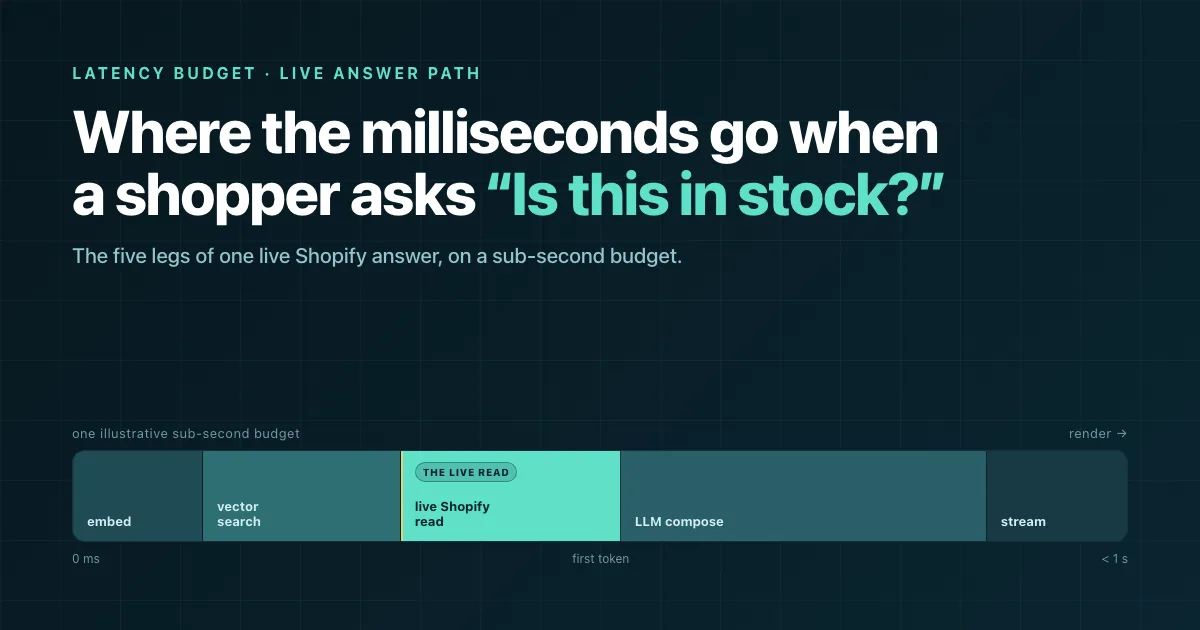
A live “is this in stock?” answer on Shopify has a latency budget, and most apps stay under it by quietly not answering live at all. A real answer reads the current state of one variant the moment the shopper asks, and that read costs time the demo never shows you.
Here is the claim I will defend: spending a hundred milliseconds to read Shopify’s current stock beats serving a fast answer off last night’s snapshot. Correct but a little late beats quick and wrong, and a snapshot is wrong the second the catalog moves.
This is the runtime view of a single answer, not the marketing view, and it sits inside our wider look at AI search for Shopify .
The bar for “fast enough” is not a Shoply number. The classic response-time research from Nielsen Norman Group puts roughly one second as the limit where a user’s flow of thought stays unbroken. That one second is the whole budget, and the answer is composed on combined AI Search + Chatbot: search retrieves candidates, chat asks Shopify the live question a search box cannot phrase.
Every live answer spends the same second, and here is where it goes
A live product answer runs five legs in order: embed the question into a vector, search the index for candidates, read the live Shopify state for the chosen variant, compose with an LLM, then render or stream. Four are roughly constant. One is variable and correctness-bearing, and it is the one most apps skip.
- Embed the question. Turn the shopper’s text into a vector. Cheap and near-constant, but on the critical path, so a cold model or a cross-region hop taxes every answer.
- Vector search. Find candidate products. Fast when the index is warm; a cold cache or an oversized candidate set is the first place the budget slips.
- The live Shopify read. Ask the Storefront or Admin API for this variant’s current stock, price, and ship state. Real, variable milliseconds, and the leg that makes the answer true.
- LLM compose. Write the answer. Usually the largest slice, and the one an over-long context inflates unnoticed.
- Render or stream. Get the first words onto the screen. Streaming shifts the metric from total latency to time-to-first-token.
The retrieval legs assemble from your catalog with zero-setup autonomous learning, so no hand-tuned synonym list bloats the path. And because the question arrives in any of 23+ languages with automatic detection , the embed leg handles the shopper’s actual words before any of this starts.
A live read keeps the answer true the moment a shopper acts on it
A shopper asks “is this in stock?” and buys on what you tell them. The value of the live Shopify read is not the speed. It is that the answer is still true a few minutes later, when they reach checkout. Read the chosen variant’s current stock, price, and ship date the instant they ask, and what they act on matches what the warehouse actually has.
Skip that read and you answer from a snapshot. Faster, and wrong the second a price or stock level changes. The shopper sees “in stock,” checks out, and the order is cancelled the next morning. They felt a quick answer and got a broken promise.
The honest “no” is the clearest win for the shopper. When the read comes back sold out, they hear “sold out, want a restock alert?” instead of a confident in-stock claim they resent at checkout. That back-in-stock path only earns trust because the read told the truth. These are the live-state reads we pay for on purpose: real-time inventory, price, and ship answers a shopper can act on.
The cost is known, not mysterious. Shopify publishes its Storefront and Admin API rate limits , so the read’s worst case under load is a number you budget for, not a surprise the shopper absorbs.
Two siblings frame the rest of the trade:
- The chatbot is what poses the live question to Shopify, the structural case in the AI Search and Chatbot pillar .
- How wrong a snapshot gets over time is the freshness teardown in AI trained on your catalog ; this post is its time-cost counterpart.
Why is my Shopify AI search slow to answer?
Four failure modes turn a sub-second answer into a two-second one, and none throw an error. The answer still arrives, just late, after the shopper has left. Each lives on a specific leg, which is what makes it findable: a cold cache, a slow API call, an over-long context, and a cross-region hop.
- Cold cache. The first query after idle pays for model and index warm-up a warm path skips. It taxes the embed and search legs, and it is why a bot feels snappy all afternoon and sluggish first thing.
- A slow Storefront API call. The live read has a variable tail. Under sale-day load, rate-limit backoff turns a clean read into a retry sequence, and the candidate set grows with catalog size. How that set explodes past six figures of SKUs is the scale-axis sibling to this post .
- An over-long context. Every extra retrieved product in the prompt is tokens the model reads before it can speak. Compose inflates silently, which is why retrieval precision is a latency feature, not just a relevance one.
- A cross-region hop. When your compute, the shopper, and Shopify’s region are far apart, a fixed network tax lands on every leg at once. Cheapest to overlook, most uniform in its damage.
Streaming is the lever that keeps the live read affordable. A shopper judges speed by when the answer starts, not when it ends, so the metric that matters is time-to-first-token. The well-documented gap between time-to-first-token and total generation time means you can start streaming while the final tokens compose.
Stream the first words while the live read resolves in the background, and a hundred-millisecond read stops being something the shopper waits on.
Where this stops working
This is one answer class, and the budget above is a model, not a measurement. It covers a live stock, price, or ship question for a chosen variant. It does not cover multi-turn reasoning chains, image queries, or long agentic tasks where a single budget stops being the right model.
A few limits worth naming:
- The budget is illustrative, not a measured p50. Every slice is a target allocation; the real numbers want instrumentation, and we have not published one.
- A single budget hides the tail. A p50 under a second says nothing about the p99 a shopper on a bad connection feels. The tail is its own project.
- Treat the five legs as the shape, not the whole map. Caching layers, speculative reads, and request coalescing all bend the picture, and none fit one diagram.
Thanks to Rui for the instrumentation reality-check that kept the numbers labeled honestly as illustrative. If you have instrumented your own live-answer path and want to compare where the milliseconds land, we would genuinely like to hear about it.
Frequently asked questions
How fast should a Shopify AI chatbot answer an in-stock question?
Well under a second to first token. The Nielsen Norman Group response-time research puts roughly one second as the limit where a user’s flow of thought stays unbroken, so the whole live answer needs to fit inside that second. The per-leg budget here is illustrative, not a measured guarantee.
Does AI product search read live inventory or a cached snapshot?
It depends on the app. A live read calls Shopify for the current state on every answer, slower but correct, while many apps answer from a periodically-refreshed snapshot that is faster but stale the moment the catalog moves. Live-state reads are the path that stays correct.
What is the slowest part of a live AI answer on Shopify?
Usually the LLM compose step, with the live Shopify API read as the most variable. An over-long retrieved context inflates compose silently, and rate-limit backoff under load is what stretches the read.
Why does my Shopify chatbot feel slow after it has been idle?
A cold cache. The first query after idle pays for model and index warm-up a warm path skips, which is why the same bot feels fast all afternoon and sluggish on the first question of the morning.
If you want to see a live read answer in real time
The fastest way to feel the difference is to ask a demo store something only the current catalog state can answer. Shoply AI runs combined AI Search and a chatbot over one live index, reads live stock, price, and ship state on the answer, and learns the catalog with zero setup.
- See it: Shopify listing at apps.shopify.com/shopping-assistant-by-shoplyai , live demo at demo.shoplyai.ai .
- Go deeper: the broader AI search for Shopify landscape, and its scale-axis sibling on what breaks past a million SKUs.
Happy building.