
Published
How to Customize Your AI’s Personality

You can guide how Shoply speaks to shoppers: its tone, answer length, and the questions it asks before recommending a product. Open AI Knowledge & Personality in your Shoply AI Admin Console to write those instructions. Keep product details and policies in AI Knowledge.
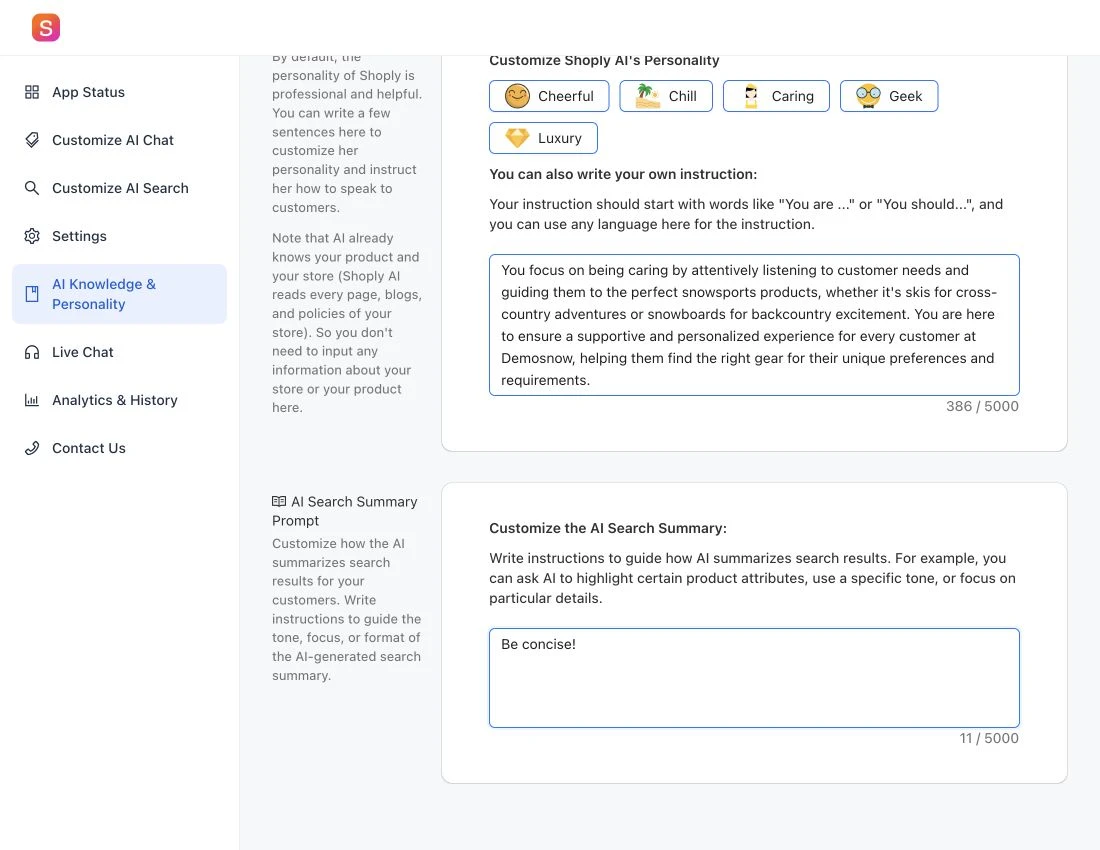
Set the chatbot’s personality
- Open AI Knowledge & Personality.
- Find AI Chat Prompt, where you set the chatbot’s tone and instructions.
- Describe the tone, answer length, and approach you want.
- Click Save when you finish, then test the instructions in a fresh conversation.
If a control is unavailable, check the plan notice beside it.
Start with clear instructions
For a helpful outdoor store assistant, you could write:
Use a friendly, practical tone. Ask about the customer’s intended activity and budget when those details would help you recommend a product. Explain the main differences in a few short sentences. If the store information does not answer a question, say what is missing rather than guessing.
For a more restrained brand voice:
Keep answers calm, concise, and professional. Avoid emojis and exaggerated claims. Explain product materials and fit using the information available in the store.
Adapt these examples to your business. Avoid conflicting directions such as “always answer in one sentence” and “always give a detailed comparison.”
Customize the AI Search summary separately
Use AI Search Summary Prompt on the same page to guide the short explanation shown with search results. You can specify its tone, which details to highlight, and how to organize them.
For example:
Briefly explain the most useful differences among the results. Focus on the features relevant to the customer’s search. Do not repeat every product title.
To enable the summary or move it above or below results, use Customize AI Search. Try the summary preview in the search customization guide.
Test before relying on the change
Try a product recommendation, a comparison, a policy question, and a question your store information cannot answer. Check accuracy as well as tone. Change one instruction at a time so you can tell what helped.
Personality instructions do not update product prices, stock, or policies. If an answer contains incorrect facts, check the AI’s knowledge sources.
For visual changes such as colors, icons, and chat-window layout, use Customize AI Chat.