
Published
How to Choose What AI Chat Says About Stock

Some stores keep selling items when Shopify shows 0 in stock. The item might ship from a warehouse that Shopify doesn’t count, be made to order, or be a real pre-order. By default, AI Chat calls these items “pre-order or back-order”. If that isn’t true for your store, type your own phrase, such as “ships from the warehouse”, and AI Chat uses it instead.
Where do I set the phrases?
In your Shoply AI Admin Console, open AI Knowledge & Personality and find Phrases used for specific situations. It has two boxes:
| Box | When AI Chat uses it | Example |
|---|---|---|
| Phrases used for “Out of stock, still for sale” | The item has Continue selling when out of stock checked in Shopify, and its Available quantity is 0 or less. | ships from the warehouse |
| Phrases used for “In stock” | The item is for sale any other way, usually because its Available quantity is above 0. | ships from the store |
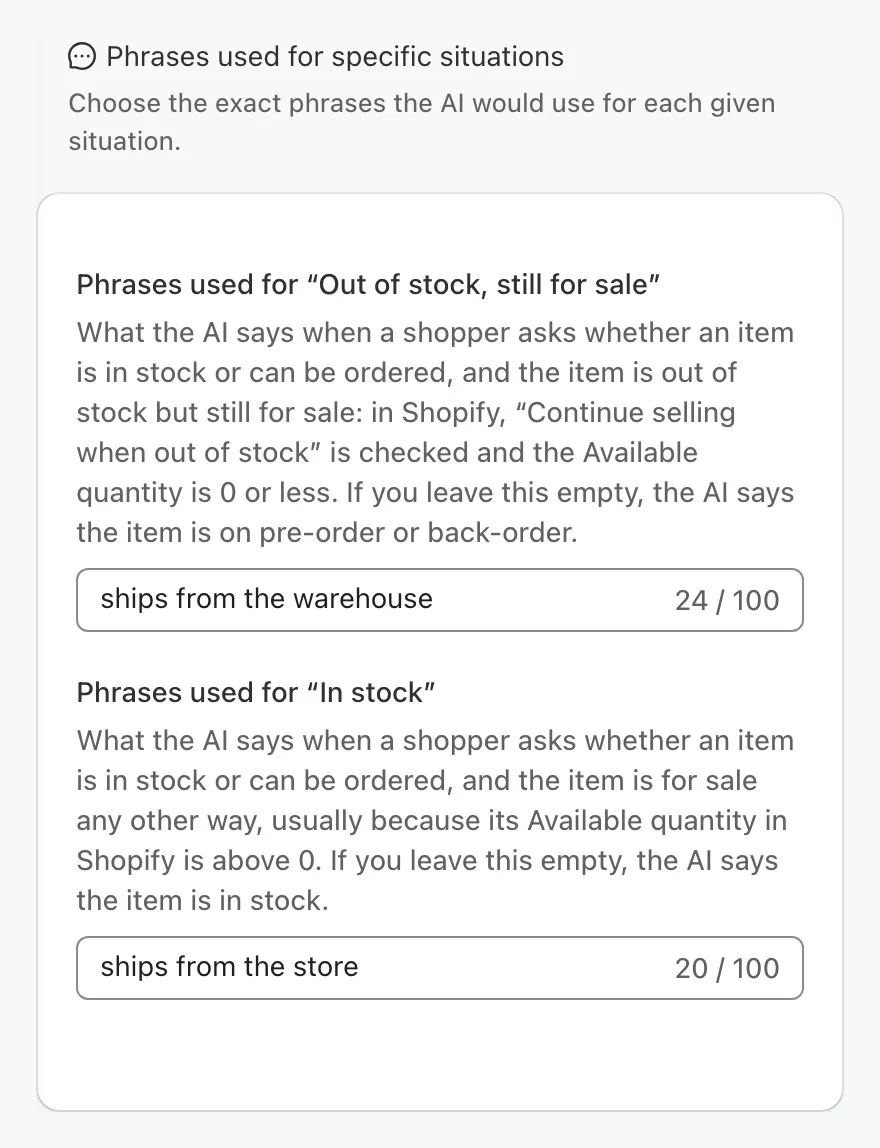
Each phrase can be up to 100 characters. Write a short phrase, not a full reply: AI Chat fits it into its own answer. For example, with “ships from the warehouse”, a shopper who asks “Is this in stock?” may get “It ships from the warehouse.”
These phrases are available on every plan, including the free plan.
Step 1: Type your phrases
- Open AI Knowledge & Personality.
- In Phrases used for specific situations, type a phrase in one or both boxes.
- Click Save. The admin shows “Phrases saved.”
Fill in both boxes if you want every item for sale described in your words. Once either box has a phrase, AI Chat is told to describe stock with your phrases only.
You don’t need to re-sync your catalog. AI Chat uses the new phrases within about a minute.
Step 2: Check AI Chat
- Open a product on your store that has “Continue selling when out of stock” checked and 0 or fewer available.
- Open AI Chat and ask “Is this in stock?”
- Check that the answer uses your phrase, such as “It ships from the warehouse.”
- Repeat with a product that has stock, to check your “In stock” phrase.
The answer still says “pre-order” or “back-order”?
- Check that you clicked Save and saw “Phrases saved.”
- Wait about a minute, then start a new chat.
- In Shopify, check the item’s inventory: the “Out of stock, still for sale” phrase applies only when Continue selling when out of stock is checked and Available is 0 or less.
What changes once I save a phrase?
- AI Chat uses your words for stock. It’s told not to add its own stock words, such as “available”, “in stock”, “not sold out”, “order”, “pre-order”, “back-order” or “unavailable”.
- No back-in-stock offers for items you still sell. AI Chat doesn’t offer a back-in-stock alert for an item with your phrase, because shoppers can buy it now.
- Sold-out items are still called sold out. An item Shopify won’t sell is still described as sold out, and AI Chat can still offer a back-in-stock alert for it.
- Each option is checked on its own. One size can be “ships from the store” while another size of the same product is “ships from the warehouse”.
What if I leave a box empty?
AI Chat uses its default wording for those items:
- “Out of stock, still for sale” left empty: these items are described as on pre-order or back-order.
- “In stock” left empty: these items are described as in stock.
To go back to the default wording, delete the text in both boxes and click Save.
What about items with “Track quantity” turned off?
In Shopify, an item with Track quantity turned off is always for sale. Shopify still keeps an old quantity and setting for it, often 0 with “Continue selling” checked, but they no longer mean anything.
- No phrases saved: AI Chat never calls these items pre-order or back-order. It describes them as in stock.
- At least one phrase saved: AI Chat follows the item’s quantity and setting, as many store themes do. An item at 0 with “Continue selling” checked gets your “Out of stock, still for sale” phrase.
If your theme shows “Ships from Warehouse” for these items, saving your phrases makes AI Chat match it.
Where does AI Chat use the phrases?
Whenever AI Chat describes a product’s stock: on a product page, for products in search results, for products it recommends, and when it checks live stock.
The phrases change only what AI Chat says. They don’t change the Sold Out labels on AI Search product cards or your Shopify product pages.
What are the limits?
- Shopify stores only. The phrases follow Shopify’s stock settings, so they don’t apply to SiteChat websites.
- One phrase for each situation. If some of your “continue selling” items are real pre-orders and others ship from a warehouse, choose a phrase that’s true for both, such as “ships in 1 to 2 weeks”. Or set the real pre-orders up differently in Shopify.
To give AI Chat other facts about your store, see How to Teach Shoply About Your Store.