
Shoply Merchant API का उपयोग कैसे करें

Shoply Merchant API किसी merchant को reporting tools, support workflows, scheduled exports, और private business applications में अपने स्वयं के Shoply data का सुरक्षित रूप से उपयोग करने देती है।
हर integration, Shoply Settings में बनाए गए revocable, store-scoped credential से authenticate होती है। आपको Shopify Admin API access token साझा करने की आवश्यकता नहीं है, और कोई integration केवल उसी store तक पहुंच सकती है जिसने उसका credential जारी किया है।
मैं Merchant API के साथ क्या कर सकता/सकती हूँ?
आप Merchant API का उपयोग इन कार्यों के लिए कर सकते हैं:
- दैनिक, साप्ताहिक, या मासिक performance results को spreadsheet या data warehouse में export करें.
- sessions, chats, searches, product clicks, add-to-cart events, purchases, और attributed revenue के लिए एक private dashboard बनाएं.
- customer activity की निगरानी करें और engagement में असामान्य बदलाव खोजें.
- support, merchandising, और answer-quality कार्य के लिए chat और search sessions की समीक्षा करें.
- customer issue की जांच करते समय किसी individual conversation timeline को प्राप्त करें.
- Shoply AI द्वारा उपयोग किए जाने वाले custom knowledge को create, update, list, और delete करें.
- knowledge base में कोई external webpage या uploaded PDF, text, या Markdown file जोड़ें.
- UTC event data को store के local timezone के साथ align करें.
यह guide सात endpoints का दस्तावेज़ीकरण करती है। इनमें से पाँच वही endpoints हैं जिनका उपयोग Shoply Admin → Analytics करता है, जबकि दो knowledge base को manage करते हैं:
| API | Category | यह क्या लौटाता है |
|---|---|---|
admin_store_analytics | Performance | दैनिक, साप्ताहिक, या मासिक performance rows और totals |
query_api_usage_count | Engagement | UTC minute या day के अनुसार grouped activity counts |
query_sessionized_chat | Conversations | Chat और search session summaries |
query_log_visualization | Conversations | एक selected session के लिए complete event timeline |
admin_get_store_metadata | Store configuration | UTC data को सही ढंग से दिखाने के लिए उपयोग किया जाने वाला store timezone |
admin_store_knowledge | Knowledge | Custom text, external pages, uploaded files, deletion, और recrawling |
user_generated_file | Knowledge files | knowledge के रूप में register होने से पहले PDF, text, या Markdown file upload करता है |
नीचे दिए गए response bodies representative samples हैं। आपके fields और values आपके store के लिए record की गई activity को दर्शाएंगे।
Deployment requirement: Store-owner secret authentication उस API server पर deployed होनी चाहिए जिसे आप call करते हैं। यदि एक valid secret HTTP
403के साथNo access_token foundलौटाती है, तो वह server अभी भी पुराना access-token-only authentication code चला रहा है।
मैं API Secret कैसे बनाऊँ?
- अपना Shoply AI admin खोलें.
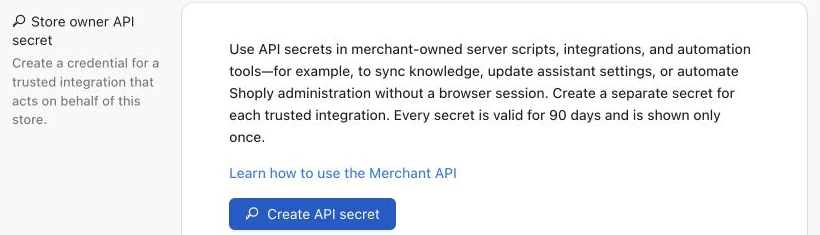
- Settings → Store owner API secret पर जाएँ.
- एक secret बनाएं और उसे ऐसा नाम दें जो integration की पहचान करे, जैसे
Weekly reporting export. - secret दिखाई देने पर उसे copy करें। Shoply plaintext value केवल एक बार दिखाता है.
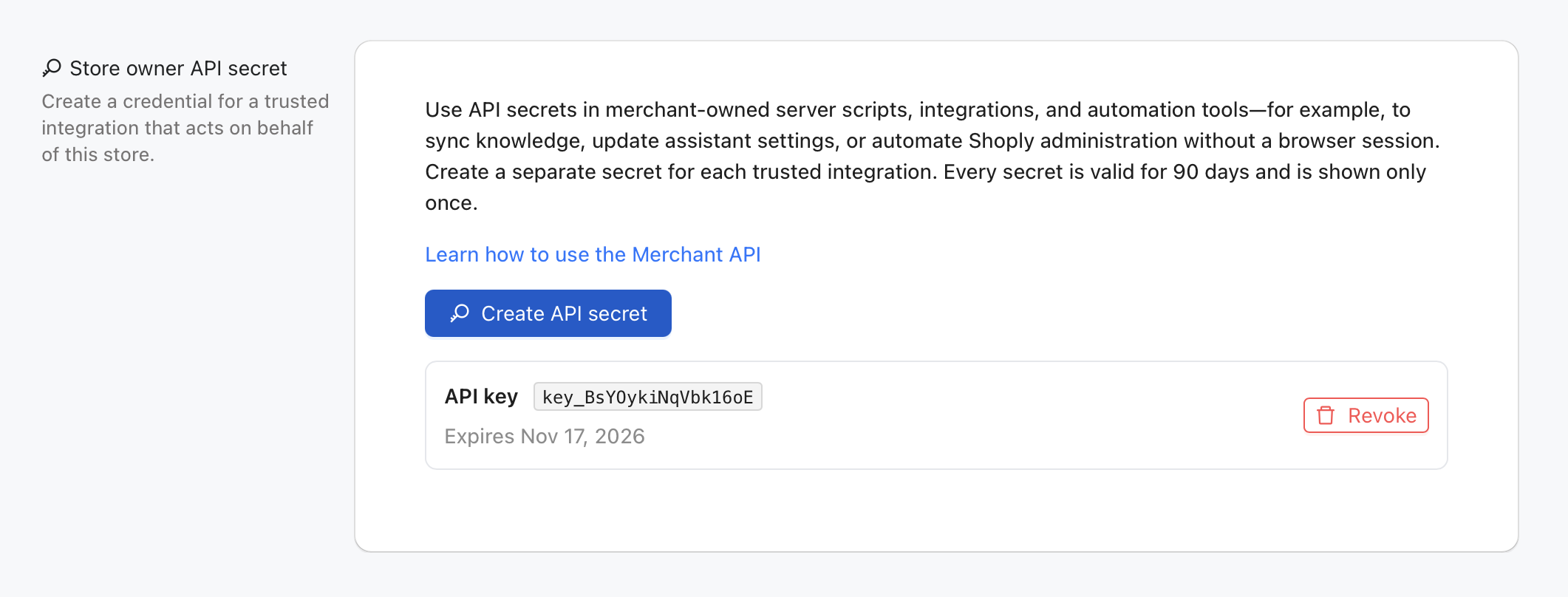
हर secret 90 दिनों के लिए मान्य होती है। एक store अलग-अलग integrations के लिए अलग secrets रख सकता है, और आप अन्य secrets को बाधित किए बिना एक secret को revoke कर सकते हैं।
इन values को server-side environment variables के रूप में सहेजें:
export SHOPLY_STORE_KEY="your-store.myshopify.com"
export SHOPLY_STORE_OWNER_API_SECRETE="shoply_owner_key_example123.secret-value"
SHOPLY_STORE_KEY के लिए store का permanent myshopify.com domain उपयोग करें, भले ही shoppers सामान्यतः किसी custom domain पर जाएँ।
Authentication कैसे काम करती है?
हर Merchant API request एक Authorization header भेजती है जिसकी value एक JSON string होती है:
{
  "store_key": "your-store.myshopify.com",
  "store_owner_api_secrete": "YOUR_STORE_OWNER_API_SECRET"
}
store_owner_api_secrete वही exact public field name है, जिसमें उसका historical spelling भी शामिल है। यह Bearer token नहीं है। पूरा JSON string सीधे Authorization header में रखें.
secret को केवल backend code में रखें। इसे URL, browser bundle, public repository, analytics event, या application log में न रखें।
क्या Official Python और Node.js Packages उपलब्ध हैं?
हाँ। Shoply दो server-side packages प्रकाशित करता है जो required authentication को automatically जोड़ते हैं और Merchant API को typed functions के रूप में expose करते हैं। दोनों packages shoplyai-public GitHub organization के अंतर्गत open source हैं।
Python Package
shoply-merchant-api package Python 3.12 को support करता है और Pydantic v2 response models का उपयोग करता है। pinned 2.1.3 release install करें:
python3.12 -m venv .venv
source .venv/bin/activate
python -m pip install "git+https://github.com/shoplyai-public/shoply-merchant-api.git@v2.1.3"
typed SessionSummary models के रूप में newest chat और search sessions प्राप्त करें:
import os

from shoply_merchant_api import ShoplyMerchantClient


with ShoplyMerchantClient(
    store_key=os.environ["SHOPLY_STORE_KEY"],
    api_secret=os.environ["SHOPLY_STORE_OWNER_API_SECRETE"],
) as shoply:
    session_response = shoply.list_sessions(limit=40)

for conversation in session_response.data:
    print(conversation.customer_id, conversation.user_questions)
यह package analytics, activity counts, complete session timelines, store timezone, और knowledge management के लिए functions भी प्रदान करता है। इसकी business-use-case guide और API reference देखें।
Node.js और TypeScript Package
shoply-merchant-api-js repository, Node.js 20 या newer के लिए @shoplyai/merchant-api package प्रदान करती है। यह built-in TypeScript declarations और बिना runtime dependencies वाला एक ESM package है। pinned 2.1.3 release को सीधे GitHub से install करें:
npm install "github:shoplyai-public/shoply-merchant-api-js#v2.1.3"Node.js server से वही newest sessions प्राप्त करें:
import { ShoplyMerchantClient } from "@shoplyai/merchant-api";

const storeKey = process.env.SHOPLY_STORE_KEY;
const apiSecret = process.env.SHOPLY_STORE_OWNER_API_SECRETE;
if (!storeKey || !apiSecret) {
  throw new Error("SHOPLY_STORE_KEY and SHOPLY_STORE_OWNER_API_SECRETE are required");
}

const shoply = new ShoplyMerchantClient({
  storeKey,
  apiSecret,
});

const sessionResponse = await shoply.listSessions({ limit: 40 });

for (const conversation of sessionResponse.data) {
  console.log(conversation.customer_id, conversation.user_questions);
}
npm package वही Merchant API endpoints cover करता है जो Python package करता है। इसकी business-use-case guide और API reference देखें।
दोनों packages trusted backend services, scheduled jobs, और private internal tools के लिए हैं। किसी भी package को storefront code में import न करें और browser bundle में API secret expose न करें।
क्या मैं Package के बिना HTTP API Call कर सकता/सकती हूँ?
हाँ। Merchant API एक standard HTTPS API बनी रहती है। नीचे दिए गए low-level Python examples Requests का उपयोग करते हैं ताकि आप complete wire contract देख सकें या किसी अन्य language से integrate कर सकें।
यदि आपके environment में Requests पहले से शामिल नहीं है, तो इसे install करें:
python -m pip install requestsनीचे दिया गया helper हर request में store key और authentication header जोड़ता है:
import json
import os
from typing import Any

import requests

BASE_URL = "https://api.shoplyai.ai"
STORE_KEY = os.environ["SHOPLY_STORE_KEY"]
STORE_OWNER_API_SECRETE = os.environ["SHOPLY_STORE_OWNER_API_SECRETE"]

session = requests.Session()
session.headers.update({
    "Authorization": json.dumps({
        "store_key": STORE_KEY,
        "store_owner_api_secrete": STORE_OWNER_API_SECRETE,
    })
})


def shoply_get(api_name: str, **params: Any) -> dict[str, Any]:
    """Call one store-scoped Shoply API and surface HTTP or API-level errors."""
    response = session.get(
        f"{BASE_URL}/{api_name}",
        params={"store_key": STORE_KEY, **params},
        timeout=30,
    )
    response.raise_for_status()

    payload = response.json()
    if payload.get("error") is not None or payload.get("statusCode") not in (None, 200):
        raise RuntimeError(payload.get("error", "Shoply API request failed"))
    return payload


def shoply_post(
    api_name: str,
    payload: dict[str, Any] | None = None,
    **params: Any,
) -> dict[str, Any]:
    """Write store-scoped data and surface HTTP or API-level errors."""
    response = session.post(
        f"{BASE_URL}/{api_name}",
        params={"store_key": STORE_KEY, **params},
        json=payload,
        timeout=60,
    )
    response.raise_for_status()

    result = response.json()
    if result.get("error") is not None or result.get("statusCode") not in (None, 200):
        raise RuntimeError(result.get("error", "Shoply API request failed"))
    return result
नीचे दिए गए examples इसी shared client का उपयोग करते हैं। दोनों helpers authenticated store key को automatically जोड़ते हैं।
क्या मैं API के माध्यम से Shoply AI Knowledge Manage कर सकता/सकती हूँ?
हाँ। admin_store_knowledge knowledge को retrieve करने के लिए GET और उसे create, update, delete, या recrawl करने के लिए POST का उपयोग करता है। ऐसा POST जो existing knowledge ID का उपयोग करता है, उस entry को update करता है; नई ID का उपयोग करने पर नई entry create होती है।
updates को automate करने से पहले, हमारी training guide में दिए गए examples के साथ उपयोगी store knowledge की योजना बनाएं।
Knowledge writes shoppers को दिखाए जाने वाले answers बदल सकती हैं। knowledge manage करने वाली system के लिए एक dedicated secret उपयोग करें, भेजने से पहले content validate करें, और इस write-capable credential को storefront JavaScript में कभी expose न करें।
Existing Knowledge की List प्राप्त करें
knowledge_payload = shoply_get(
    "admin_store_knowledge",
    knowledge_id_to_retrieve="_ALL_",
)

for knowledge_id, knowledge in knowledge_payload["data"].items():
    print(knowledge_id, knowledge.get("title"))
Sample Response
{
  "data": {
    "knowledge::shipping-policy": {
      "title": "Shipping policy",
      "text": "Orders leave our warehouse within two business days.",
      "epoch_edit": 1787211246
    }
  }
}
Custom Text Knowledge Create या Update करें
एक stable, unique knowledge ID चुनें। उस entry को update करते समय वही ID दोबारा उपयोग करें।
from time import time

knowledge_id = "knowledge::shipping-policy"
result = shoply_post(
    "admin_store_knowledge",
    {
        knowledge_id: {
            "title": "Shipping policy",
            "text": (
                "Orders leave our warehouse within two business days. "
                "Standard delivery normally takes three to five business days."
            ),
            "epoch_edit": int(time()),
        }
    },
)

print(result)
Sample Response
{
  "statusCode": 200
}
एक successful response का अर्थ है कि knowledge save हो गई। Search indexing में कुछ मिनट लग सकते हैं, इसलिए नया answer तुरंत दिखाई नहीं भी दे सकता। यदि API रिपोर्ट करती है कि content save हो गया है लेकिन indexing delayed है, तो write को retry करने से पहले GET के साथ stored entry की पुष्टि करें।
एक External Webpage जोड़ें
ऐसी ID उपयोग करें जो external_url:: से शुरू होती हो। पूरा http:// या https:// URL text में रखें।
from time import time

result = shoply_post(
    "admin_store_knowledge",
    {
        "external_url::returns-policy": {
            "title": "Returns and exchanges",
            "text": "https://www.example.com/policies/returns",
            "epoch_edit": int(time()),
        }
    },
)
Knowledge File Upload और Register करें
Knowledge files PDF, TXT, या Markdown होनी चाहिए और 5 MB से छोटी होनी चाहिए। पहले file upload करें, फिर returned private S3 location को knowledge entry के रूप में save करें।
from pathlib import Path
from time import time

file_path = Path("shipping-policy.md")
with file_path.open("rb") as file_handle:
    upload_response = session.post(
        f"{BASE_URL}/user_generated_file",
        params={"store_key": STORE_KEY, "folder": "knowledge_file"},
        files={"file": (file_path.name, file_handle, "text/markdown")},
        timeout=60,
    )

upload_response.raise_for_status()
uploaded = upload_response.json()
if uploaded.get("statusCode") != 200:
    raise RuntimeError(uploaded.get("error", "Knowledge file upload failed"))

shoply_post(
    "admin_store_knowledge",
    {
        "knowledge_file::shipping-policy": {
            "title": "Shipping policy document",
            "text": uploaded["file_url"],
            "epoch_edit": int(time()),
        }
    },
)
Sample Upload Response
{
  "message": "File uploaded successfully",
  "statusCode": 200,
  "file_url": "s3://shoplystores/your-store.myshopify.com/uploads/shipping-policy.md"
}
file_url को Shoply द्वारा returned एक opaque private location की तरह मानें। इसे स्वयं न बनाएं और न बदलें।
Knowledge Delete करें
Deletion permanent होती है। पहले current entries retrieve करें और केवल वही exact IDs भेजें जिन्हें आप हटाना चाहते हैं।
result = shoply_post(
    "admin_store_knowledge",
    {
        "knowledge_ids_to_delete": [
            "knowledge::shipping-policy",
            "external_url::returns-policy",
            "knowledge_file::shipping-policy",
        ]
    },
)
Website Recrawl Request करें
जब merchant की website पर content बदलता है, तब recrawl उपयोग करें। हर custom text update के बाद सामान्यतः इसकी आवश्यकता नहीं होती।
result = shoply_post(
    "admin_store_knowledge",
    re_crawl_ind="true",
)
Business Use Cases
- किसी internal content system से shipping, returns, warranty, sizing, या product-care guidance को synchronize करें.
- temporary campaign या holiday information को manually Shoply Admin में copy किए बिना publish करें.
- deployment workflow के हिस्से के रूप में कोई policy webpage या approved document knowledge base में जोड़ें.
- policy या promotion समाप्त होते ही obsolete guidance हटा दें.
Merchant API Examples
1. Performance Analytics प्राप्त करें
admin_store_analytics, Analytics → Summary table को power करता है। यह sessions, chats, searches, clicks, add-to-cart events, purchases, और attributed revenue लौटाता है।
Endpoint
GET https://api.shoplyai.ai/admin_store_analyticsQuery Parameters
| Parameter | Required | Description |
|---|---|---|
store_key | Yes | shared client द्वारा जोड़ा गया |
report_type | Yes | daily, weekly, या monthly |
start_date | Daily/weekly | YYYYMMDD के रूप में formatted inclusive UTC date |
end_date | Daily/weekly | YYYYMMDD के रूप में formatted inclusive UTC date |
Monthly reports, Shoply के stored monthly history का उपयोग करती हैं और date bounds की आवश्यकता नहीं होती।
Python Example
daily_report = shoply_get(
    "admin_store_analytics",
    report_type="daily",
    start_date="20260801",
    end_date="20260820",
)

for row in daily_report["data"]:
    print(row["date"], row["sessions"], row["purchases"], row["revenue"])

print("Totals:", daily_report["totals"])

# Weekly rows use the Monday of each week as their date label.
weekly_report = shoply_get(
    "admin_store_analytics",
    report_type="weekly",
    start_date="20260701",
    end_date="20260820",
)

# Monthly requests do not need start_date or end_date.
monthly_report = shoply_get("admin_store_analytics", report_type="monthly")
Sample Response
{
  "data": [
    {
      "date": "20260820",
      "sessions": 42,
      "chats": 18,
      "searches": 24,
      "clicks": 11,
      "add_to_cart": 5,
      "purchases": 2,
      "revenue": "$168.00",
      "revenue_usd": "$168.00"
    }
  ],
  "totals": {
    "date": "totals",
    "sessions": 42,
    "chats": 18,
    "searches": 24,
    "clicks": 11,
    "add_to_cart": 5,
    "purchases": 2,
    "revenue": "$168.00",
    "revenue_usd": "$168.00"
  },
  "report_type": "daily"
}
Revenue में एक से अधिक currency हो सकती हैं। revenue को display text की तरह मानें। जब आपको Shoply द्वारा दिखाया गया normalized USD value चाहिए, तब revenue_usd उपयोग करें।
Business Use Cases
- merchant या ecommerce team को daily sales-impact summary भेजें.
- funnel drop-off खोजने के लिए searches, product clicks, add-to-cart events, और purchases की तुलना करें.
- Shoply Admin page को scrape किए बिना weekly या monthly business-intelligence dashboard को feed करें.
- समय के साथ attributed revenue track करें और उसकी तुलना merchandising या campaign changes से करें.
2. Store Timezone प्राप्त करें
admin_get_store_metadata, Analytics → Chat & Search History में दिखाए जाने वाले timezone badge को supply करता है। page इसका उपयोग UTC activity को store के local time में translate करने के लिए करता है।
Endpoint
GET https://api.shoplyai.ai/admin_get_store_metadataQuery Parameters
| Parameter | Required | Description |
|---|---|---|
store_key | Yes | shared client द्वारा जोड़ा गया |
metadata_key | Yes | literal value time_zone का उपयोग करें |
Python Example
timezone_payload = shoply_get(
    "admin_get_store_metadata",
    metadata_key="time_zone",
)

timezone = timezone_payload["data"]
print(timezone["ianaTimezone"], timezone["timezoneOffsetMinutes"])
Sample Response
{
  "data": {
    "ianaTimezone": "America/Los_Angeles",
    "timezoneOffset": -7,
    "timezoneOffsetMinutes": -420
  },
  "statusCode": 200
}
Business Use Cases
- UTC activity को उन्हीं local calendar days में group करें जो merchant को Analytics में दिखाई देते हैं.
- store का local day समाप्त होने के बाद daily exports schedule करें.
- reports को
America/Los_Angelesजैसे unambiguous IANA timezone से label करें.
Daylight-saving rules के कारण timezone offsets बदल सकते हैं। यदि आपका reporting system support करता है, तो एक numeric offset को permanently save करने के बजाय ianaTimezone को प्राथमिकता दें।
3. Activity Counts प्राप्त करें
query_api_usage_count, UTC date या original UTC minute के अनुसार grouped store activity लौटाता है। यह Analytics → Chat & Search History में activity chart का source भी है।
Endpoint
GET https://api.shoplyai.ai/query_api_usage_countQuery Parameters
| Parameter | Required | Description |
|---|---|---|
start_dt_utc | Yes | YYYY-MM-DD HH:mm:ss के रूप में UTC start time |
end_dt_utc | Yes | YYYY-MM-DD HH:mm:ss के रूप में UTC end time |
groupby | No | daily totals के लिए utc_date या minute rows के लिए utc_date_time |
Python Example
activity = shoply_get(
    "query_api_usage_count",
    start_dt_utc="2026-08-01 00:00:00",
    end_dt_utc="2026-08-20 23:59:59",
    groupby="utc_date",
)

for row in activity["data"]:
    print(row)
Sample Response
{
  "data": [
    {
      "utc_date": "2026-08-20",
      "QA": 18,
      "CHAT": 18,
      "SEARCH": 20,
      "CACHED_SEARCH": 4,
      "PRODUCT_SEARCH": 22,
      "CLICK": 11,
      "ADD_TO_CART": 5,
      "CHECKOUT": 2
    }
  ]
}
Rows में उस period के लिए उपलब्ध activity counters शामिल होते हैं, जैसे chat questions, searches, clicks, add-to-cart events, और checkout events। जिन counters में कोई activity नहीं होती, वे zero पर set होने के बजाय अनुपस्थित हो सकते हैं।
Business Use Cases
- Chat & Search History वाले chart जैसा hourly या daily activity chart बनाएं.
- unusual traffic spikes या customer engagement में अचानक drops का पता लगाएं.
- product-search volume की clicks, add-to-cart events, और checkouts से तुलना करें.
- अनुमान लगाएं कि support और merchandising teams को सबसे busy periods की समीक्षा कब करनी चाहिए.
4. Chat और Search Session Summaries प्राप्त करें
query_sessionized_chat, हर customer session के लिए एक compact record लौटाता है। यह Analytics → Chat & Search History में session list को भी power करता है।
Endpoint
GET https://api.shoplyai.ai/query_sessionized_chatQuery Parameters
| Parameter | Required | Description |
|---|---|---|
start_dt_utc | Yes | UTC start time, या literal value undefined |
end_dt_utc | Yes | UTC end time, या literal value undefined |
num_sessions | No | जब किसी भी bound का मान undefined हो, तब select किए जाने वाले sessions की संख्या |
ScanIndexForward | No | newest sessions को पहले select करने के लिए false उपयोग करें |
Latest 40 Sessions प्राप्त करें
summary_payload = shoply_get(
    "query_sessionized_chat",
    start_dt_utc="undefined",
    end_dt_utc="undefined",
    num_sessions=40,
    ScanIndexForward="false",
)

sessions = summary_payload["data"]
for conversation in sessions:
    print(conversation["customer_id"], conversation.get("user_questions", ""))
UTC Range में Sessions प्राप्त करें
summary_payload = shoply_get(
    "query_sessionized_chat",
    start_dt_utc="2026-08-20 00:00:00",
    end_dt_utc="2026-08-20 23:59:59",
    ScanIndexForward="false",
)
जब दोनों time bounds मौजूद हों, API complete range के sessions लौटाती है; num_sessions उस bounded query को limit नहीं करता।
Sample Response
{
  "data": [
    {
      "customer_id": "customer-or-session-id",
      "user_questions": "Do you have this in blue?\nWhen will it ship?",
      "start_timestamp_ms": 1787184000000,
      "end_timestamp_ms": 1787184065000,
      "session_types": "product information, click",
      "customer_email": null,
      "customer_info": {},
      "sentiment": "positive",
      "num_questions": 2,
      "num_searches": 1,
      "num_clicks": 1
    }
  ]
}
Optional fields session के अनुसार बदलते हैं। यदि आप complete timeline प्राप्त करने की योजना बना रहे हैं, तो customer_id, start_timestamp_ms, और end_timestamp_ms को बनाए रखें।
Business Use Cases
- answer quality और support training के लिए recent conversations के sample की समीक्षा करें.
- repeated customer questions खोजें जो product copy या FAQs को प्रभावित करनी चाहिए.
- searches, product clicks, या अन्य shopping actions वाले high-intent sessions की पहचान करें.
- बड़े event-level payload से बचते हुए trend analysis के लिए प्रति session एक row export करें.
5. एक Complete Session प्राप्त करें
उसके customer, AI, search, और commerce events प्राप्त करने के लिए किसी selected summary को query_log_visualization में पास करें।
Endpoint
GET https://api.shoplyai.ai/query_log_visualizationQuery Parameters
| Parameter | Required | Description |
|---|---|---|
date_time_utc_start | Yes | UTC YYYY-MM-DD HH:mm:ss के रूप में formatted session start |
date_time_utc_end | Yes | UTC YYYY-MM-DD HH:mm:ss के रूप में formatted session end |
session_id | No | summary का customer_id, जो पुराने history records के लिए उपयोग होता है |
start_timestamp_ms | Recommended | summary का exact millisecond start timestamp |
Python Example
from datetime import datetime, timezone


def utc_from_milliseconds(timestamp_ms: int) -> str:
    """Format a Shoply millisecond timestamp for the history API."""
    value = datetime.fromtimestamp(timestamp_ms / 1000, tz=timezone.utc)
    return value.strftime("%Y-%m-%d %H:%M:%S")


selected = sessions[0]
timeline_payload = shoply_get(
    "query_log_visualization",
    date_time_utc_start=utc_from_milliseconds(selected["start_timestamp_ms"]),
    date_time_utc_end=utc_from_milliseconds(selected["end_timestamp_ms"]),
    session_id=selected["customer_id"],
    start_timestamp_ms=selected["start_timestamp_ms"],
)

for event in timeline_payload["data"]:
    print(event.get("server_timestamp_ms"), event.get("action_type"))
Sample Response
{
  "data": [
    {
      "action_type": "QA",
      "session_id": "customer-or-session-id",
      "utc_date_time": "2026-08-20 00:00:00",
      "start_timestamp_ms": 1787184000000,
      "server_timestamp_ms": 1787184000123,
      "Q": {
        "question": "Do you have this in blue?",
        "question_context": {}
      },
      "task_id": "task-id",
      "list_tokens": [
        {
          "data_type": "LLMOutput",
          "data": "Yes. These blue options are currently available."
        }
      ],
      "dict_search_results": {}
    }
  ]
}
Timeline में customer questions, AI answers, search results, product clicks, add-to-cart events, checkout events, और human-agent participation शामिल हो सकते हैं। mixed event types को order करने के लिए server_timestamp_ms का उपयोग करें। पुराने records में कम fields हो सकते हैं।
Business Use Cases
- support investigation के दौरान ठीक-ठीक audit करें कि customer ने क्या पूछा और Shoply ने क्या उत्तर दिया.
- shopper को दिखाए गए search results और products के साथ answer quality की समीक्षा करें.
- question से click, add-to-cart, या checkout तक की journey को reconstruct करें.
- unrelated history में खोज किए बिना customer द्वारा report की गई एक session का diagnosis करें.
क्या मैं हर API के लिए एक ही Secret उपयोग कर सकता/सकती हूँ?
हाँ। एक valid store_owner_api_secrete एक store तक scoped होती है और ऊपर दिए गए Merchant API endpoints में काम करती है। SiteChat accounts के लिए, यही secret catalog upload APIs को भी authenticate करती है। अधिक सुरक्षित operations के लिए, अलग systems के लिए अलग named secrets उपयोग करें—उदाहरण के लिए, एक nightly data export के लिए और दूसरी internal dashboard के लिए।
यदि कोई integration retire हो जाए या compromise हो जाए, तो Shoply Settings में केवल उसकी secret revoke करें। बाकी integrations काम करती रहेंगी।
Expiry, Privacy, और Errors के बारे में मुझे क्या जानना चाहिए?
यह समझने के लिए कि customer answers के लिए कौन-सी information उपलब्ध है, Shoply data sources और privacy की भी समीक्षा करें।
- Store-owner API secrets 90 days के बाद expire हो जाती हैं। replacement बनाएं और expiry date से पहले integration update करें.
- Shoply की standard chat और search history retention period भी 90 days है। Secret expiry और data retention अलग policies हैं.
- History responses में personal data हो सकती है, जिनमें customer identifiers, email addresses, approximate location, questions, और shopping activity शामिल हैं। इसे अपनी privacy policy और लागू कानून के अनुसार store और process करें.
- HTTP
403का अर्थ है कि secret missing, invalid, expired, revoked है, या किसी दूसरे store की है. - HTTP
422का अर्थ आमतौर पर है कि कोई required query parameter missing है या उसका नाम गलत है. - HTTP
500याstatusCode: 500वाली response का अर्थ है कि request Shoply तक पहुँच गई लेकिन पूरी नहीं हो सकी। temporary failures को backoff के साथ retry करें और यदि error जारी रहे तो हमसे संपर्क करें. - exports और recurring jobs के लिए bounded UTC ranges उपयोग करें ताकि responses manageable रहें.
क्या Product Search Merchant API का हिस्सा है?
Shoply की public product-search API का authentication और request contract अलग है। यदि आप private merchant data के बजाय shopper-facing experience के लिए product search results चाहते हैं, तो API के माध्यम से Shoply AI Search तक कैसे पहुँचें देखें।
क्या SiteChat Merchants Product Catalog Upload कर सकते हैं?
हाँ। SiteChat accounts उसी store-owner API secret के साथ structured products और product images upload कर सकते हैं। वे catalog endpoints अलग से SiteChat के लिए अपना Catalog कैसे Upload करें में documented हैं। Shopify stores products को Shopify के माध्यम से sync करना जारी रखते हैं और उन upload routes का उपयोग नहीं करते।
Integration में सहायता के लिए, Shoply AI से संपर्क करें.